




















































































TXTWRK Servers
Infrastructure Development & Feasibility Report
October 2026 | Concept & Research Edition
TXTWRK — https://txtwrk.com
> Imagine a TXTWRK Server switched on by someone in your family today. A hundred years from now, that same server is still running, still connected and still contributing to the network. It may have needed maintenance, upgrades and periods of downtime, but the network kept working while it rested.
Built to outlast generations. Designed to evolve.
Executive Summary
TXTWRK proposes a new approach to digital infrastructure, combining accessible home servers, simplified software, partner integrations and an optional distributed computing network.
The initiative has two principal products:
| Product | Proposed Starting Price | Purpose |
|---|---|---|
| TXTWRK Server One | From £1,000 | Home hosting for businesses and communities |
| TXTWRK Servers: Local Open Compute | From £3,000 | Server One capabilities plus distributed computing participation |
The network begins as a hybrid of residential nodes, traditional data centers, cloud infrastructure and content delivery partners. Over time, more workloads may be distributed when technically and commercially feasible.
---
Part One — TXTWRK Servers
1. Product Vision
TXTWRK Servers are plug-and-play devices designed to help people establish and operate businesses, websites and communities from home.
The product prioritizes user experience. Customers should be able to connect their hardware, complete a guided setup and begin using their server without specialist systems administration knowledge.
Core Principles
•Plug-and-play installation.
•Locally controlled infrastructure.
•Preinstalled server software.
•A simple local management interface.
•Optional integration with txtwrk.com.
•Access to partner applications and services.
•Security, updates and backup support.
•Long-term maintainability and repairability.
2. User Experience
The intended setup journey is:
1. Unbox the TXTWRK Server.
2. Connect power and networking.
3. Open the local setup interface.
4. Configure administrator access and security.
5. Optionally connect a TXTWRK account.
6. Configure domains, applications and services.
7. Launch a website, community or business platform.
The local interface should remain useful even when TXTWRK's central platform is temporarily unavailable.
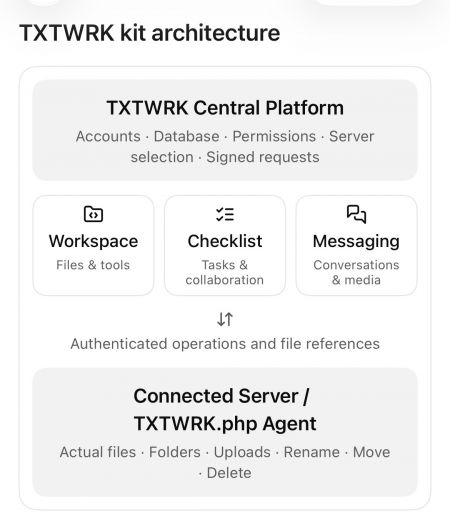
3. Software Architecture
| Layer | Function |
|---|---|
| Local interface | Device management, storage, applications and networking |
| TXTWRK platform | Accounts, domains, licensing, support and partner integrations |
| Partner services | Website builders, management panels, security and backup |
| Server operating environment | Hosting, containerization, updates and monitoring |
| Network services | Optional connectivity to the wider TXTWRK ecosystem |
4. Hardware Requirements
| Component | Proposed Requirement |
|---|---|
| CPU | Efficient multicore processor |
| RAM | Expandable memory |
| Storage | SSD-based system and application storage |
| Networking | Reliable Ethernet connectivity |
| Security | Secure boot, encryption and authenticated identity |
| Cooling | Efficient, maintainable cooling |
| Power | Low idle consumption and safe shutdown |
| Construction | Repairable and replaceable components |
| Software | Preinstalled TXTWRK environment |
5. Commercial Positioning
Proposed starting price: £1,000.
The objective is to provide accessible infrastructure for individuals, startups and communities.
The price is an initial target. Manufacturing costs, taxes, support, warranties and commercial viability remain to be validated.
---
Part Two — TXTWRK Servers: Local Open Compute
6. Concept
Local Open Compute extends TXTWRK Server One by providing additional resources for participation in a coordinated distributed computing network.
The enhanced product includes the capabilities of Server One and additional storage, processing and networking capacity.
Customers can operate their own services while optionally contributing agreed resources to the wider network.
7. Resource Allocation
The initial concept proposes 1 TB of dedicated Local Open Compute storage per participating device, separate from personal or business storage.
| Resource | Initial Allocation | Purpose |
|---|---|---|
| Total dedicated network storage | 1 TB | Distributed network participation |
| CDN-style cache | 100 GB | Frequently requested content |
| Remaining storage | 900 GB | Other approved network storage workloads |
| CPU | To be specified | Independent processing tasks |
| GPU | Model-dependent | Supported accelerated workloads |
| Bandwidth | Managed allocation | Network delivery and resource sharing |
Actual usable storage will be lower after operational overhead.
8. Network Architecture
TXTWRK proposes a hybrid infrastructure combining:
•Independently owned home servers.
•TXTWRK network coordination services.
•Partner cloud infrastructure.
•Traditional data centers.
•CDN providers.
•Regional storage and processing nodes.
The coordination system would allocate workloads according to location, availability, performance, security and cost.
The network should initially focus on workloads that do not require extremely low-latency communication between distributed machines.
9. Local Content Distribution
Popular files could be replicated across approved nodes in relevant geographic regions.
For example, a UK business could have suitable static assets cached on several participating servers serving different locations.
The network would need to account for:
•Content popularity and geographic demand.
•Node availability and upload capacity.
•Network routing and latency.
•Storage replication and consistency.
•Security and encryption.
•Bandwidth usage and partner agreements.
Residential nodes would complement conventional CDNs where measurements show an advantage.
Geographic proximity alone does not guarantee improved performance.
10. Distributed Compute
Potential workloads include:
•Independent CPU processing.
•Batch processing.
•AI inference requests.
•Selected GPU workloads.
•Media processing.
•Distributed storage and caching.
•Background application jobs.
Large-scale AI training may remain better suited to specialized data centers because of the high-speed communication requirements between GPUs.
TXTWRK should investigate compute workloads through research and controlled benchmarks before making performance commitments.
11. Bandwidth and Network Coordination
TXTWRK and participating partners would establish mutually agreed network policies.
These would govern:
•Resource allocation.
•Bandwidth commitments.
•Workload scheduling.
•Service quality.
•Node eligibility.
•Network monitoring.
•Security and compliance.
Participants should have clear visibility into resource commitments and the ability to manage participation within agreed terms.
12. Credits and Compensation
Participating owners could earn TXTWRK credits for verified resource contributions.
| Mechanism | Proposed Approach |
|---|---|
| Storage contributions | Reward verified useful capacity and availability |
| Compute contributions | Reward successfully completed workloads |
| Bandwidth contributions | Reward approved data delivery |
| Compensation | TXTWRK credits |
| Redemption | Optional periodic cash settlement |
| Settlement frequency | Quarterly, six-monthly or another agreed interval |
No financial return is guaranteed.
13. Security
The network should use defense-in-depth security.
Proposed measures include:
•Secure boot and signed updates.
•Encrypted storage and network traffic.
•Authenticated node identities.
•Workload isolation.
•Remote attestation where supported.
•Tamper detection.
•Compromise monitoring.
•Automated quarantine and service migration.
A physical tamper event could generate a report to trusted infrastructure or nearby nodes, but this must not be treated as proof that a compromised device can reliably report its own condition.
14. Reliability and Failover
The network should tolerate individual devices going offline for maintenance, cooling, hardware failure or connectivity interruptions.
Potential techniques include:
•Replicated storage.
•Erasure coding.
•Redundant service execution.
•Health monitoring.
•Automated failover.
•Planned workload migration.
•Backup and recovery.
A node may temporarily stop operating while another eligible node handles its supported workload.
Availability guarantees will depend on redundancy and tested recovery procedures.
15. Hybrid Infrastructure
TXTWRK will initially depend on a combination of residential infrastructure and conventional providers.
Traditional data centers remain important for:
•Central coordination.
•High-bandwidth workloads.
•Critical services.
•Large GPU clusters.
•Disaster recovery.
•Regional connectivity.
Long-term research may investigate greater network independence, but independence is not required for the initial commercial model.
---
Part Three — Sustainability and Product Longevity
16. Long-Term Device Support
TXTWRK proposes a development culture based on durability rather than frequent hardware replacement.
New product editions may be introduced approximately every three to five years.
Older devices should remain compatible with supported network functions wherever feasible.
The ambition is to maintain useful participation for decades through updates, repairs and changing workload assignments.
17. Hardware Repurposing
Older nodes may transition to less demanding responsibilities.
| Device Condition | Potential Role |
|---|---|
| New high-performance device | Advanced applications and compute |
| Mature device | General hosting and distributed storage |
| Older compatible device | Caching and lightweight processing |
| Limited-capacity device | Monitoring or other low-demand services |
| Unsupported or unsafe device | Retirement, refurbishment or recycling |
18. Buyback and Recycling
TXTWRK may develop a buyback program to support upgrades and responsible reuse.
Returned devices could be:
•Inspected and refurbished.
•Reassigned to educational projects.
•Redeployed for lighter workloads.
•Used for spare parts.
•Recycled when continued operation is no longer viable.
Energy consumption, repair costs and cybersecurity support must determine whether continued operation is practical.
---
Part Four — Research and Partnerships
19. Collaborative Development
TXTWRK intends to develop the initiative with industry specialists, technology partners, independent researchers and volunteers.
Research areas include:
•Server hardware and manufacturing.
•Networking and connectivity.
•Distributed storage.
•GPU and CPU scheduling.
•Cybersecurity.
•Energy efficiency.
•Application integration.
•Customer experience.
•Resource accounting.
Volunteer research should have clear expectations, appropriate recognition and genuine educational value. Commercial operational responsibilities require appropriate resourcing.
20. Partner Opportunities
| Partner Category | Potential Contribution |
|---|---|
| Hardware manufacturers | Components and modular server designs |
| Hosting companies | Domain services and management tools |
| Network operators | Connectivity and routing expertise |
| Cloud providers | Hybrid compute and storage |
| CDN operators | Content delivery integration |
| Security companies | Device trust and threat protection |
| Universities | Research and independent testing |
| Software developers | Applications and platform integrations |
---
Part Five — Network Capacity and Economics
21. Illustrative Storage Growth
Assuming each participating Local Open Compute server contributes 1 TB of raw dedicated storage:
| Participating Servers | Raw Network Storage | CDN Cache Allocation |
|---|---|---|
| 100 | 100 TB | 10 TB |
| 1,000 | 1 PB | 100 TB |
| 10,000 | 10 PB | 1 PB |
| 100,000 | 100 PB | 10 PB |
| 1,000,000 | 1 EB | 100 PB |
They are not customer acquisition or deployment forecasts.
22. Economic Requirements
The commercial feasibility model must evaluate:
•Hardware manufacturing costs.
•Product distribution and warranty costs.
•Electricity consumption.
•Residential internet limitations.
•Network coordination expenses.
•Customer support.
•Security operations.
•Partner revenue sharing.
•Resource compensation.
•Real customer demand.
Network participation must create sufficient value to justify its operating costs.
23. Principal Technical Challenges
| Challenge | Research Response |
|---|---|
| Residential upload limitations | Benchmarking and workload selection |
| Dynamic IP addresses and NAT | Secure tunnels and connectivity services |
| Unreliable nodes | Redundancy and automated recovery |
| Hardware differences | Standardized compatibility profiles |
| Data security | Encryption and isolation |
| Network economics | Usage metering and resource accounting |
| Electricity costs | Energy-efficient scheduling |
| Long-term support | Modular design and compatibility policies |
| Legal compliance | Data protection and regulatory assessment |
Part Six — Development Roadmap
24. Proposed Development Phases
| Phase | Objective | Principal Deliverable |
|---|---|---|
| 1 | Product definition | User experience and hardware requirements |
| 2 | Standalone prototype | Working TXTWRK Server |
| 3 | Platform integration | TXTWRK account and partner connectivity |
| 4 | Distributed research | Small Local Open Compute test network |
| 5 | Pilot deployment | Reliability and performance measurements |
| 6 | Commercial validation | Manufacturing and economic assessment |
| 7 | Controlled expansion | Additional models and network growth |
25. Research Milestones
Before a wider launch, TXTWRK should demonstrate:
1. A working plug-and-play standalone server.
2. Reliable local hosting and management.
3. Secure TXTWRK platform integration.
4. A small distributed storage network.
5. Tested failover and node recovery.
6. Verified bandwidth and compute accounting.
7. Measurable energy and operating costs.
8. A commercially viable support and compensation model.
---
Part Seven — Industry Opportunity
26. Reusing Established Technologies Differently
TXTWRK is not claiming to invent distributed computing, edge hosting, failover or CDN technology.
The proposal is to combine established technologies into a more accessible, integrated product ecosystem.
The innovation opportunity lies in:
•Making home infrastructure approachable.
•Connecting owned servers to useful services.
•Enabling optional distributed participation.
•Creating an accessible partner ecosystem.
•Supporting long-term hardware use.
•Developing sustainable resource compensation.
•Making infrastructure education part of the product experience.
The objective is to revisit barriers that have historically limited adoption and test whether new hardware, software and network approaches can overcome them.
27. Supporting UK Startups
TXTWRK aims to make infrastructure ownership a practical option for UK entrepreneurs and community organizations.
The long-term ambition includes reaching a potential market of millions of new and existing businesses.
This represents a strategic aspiration rather than a verified market forecast.
28. Criteria for Success
TXTWRK should measure success through:
•Customer ease of use.
•Service reliability.
•Hardware longevity.
•Security.
•Economic sustainability.
•Partner participation.
•Network utilization.
•Environmental performance.
•Accessibility to small organizations.
The project should progress from working prototypes and measured evidence rather than assuming that theoretical capacity automatically produces commercial value.
---
Conclusion
TXTWRK Servers and TXTWRK Servers: Local Open Compute represent two interconnected initiatives.
Part One enables individuals, communities and businesses to operate their own digital infrastructure through accessible home server hardware and integrated software.
Part Two investigates how independently owned devices can contribute to a wider distributed computing network.
The network begins as a hybrid system, combining home infrastructure with established hosting, cloud and data center services.
Its long-term direction emphasizes sustainability, maintainability, local ownership and collaborative innovation.
The technical and commercial challenges are significant. Success will require partnerships, prototypes, research and measured validation.
TXTWRK's objective is to make digital infrastructure accessible today while developing a network capable of evolving for generations.
---
Founding Principle
> Build locally. Connect globally. Last for generations.
A server should not be defined only by the day it was manufactured, but by the value it can continue providing to the people and networks that depend on it.
---
Document Status: Initial Concept and Feasibility Report
Organization: TXTWRK
Website: https://txtwrk.com
Date: October 2026
Commercial Status: Proposed product concepts, indicative starting prices and research objectives. Specifications, performance, partnerships and release plans remain subject to validation.
Let’s work together @Meta & @XAI
Read More




COMMUNITY
People