TXTWRK Development Report
Audio Across Posts, Checklists & Messaging
16 September 2026
Today marked a significant expansion of audio communication across TXTWRK.
What began as Audio Rooms connected to posts has now developed into audio functionality spanning
three major areas of the network:
1.
Posts — Audio Rooms
2.
Checklists — Audio Rooms
3.
Messaging — Audio Chats
Rather than creating one generic audio feature and forcing it into every part of TXTWRK, each implementation has been designed around the permissions, storage requirements and user behaviour of the area in which it operates.
The result is the beginning of a
network-wide audio communication layer across TXTWRK.
---
1. Audio Rooms in Posts
The first implementation provides
Audio Rooms attached directly to TXTWRK posts.
A post can contain its own Audio Room, allowing the post itself to become the centre of a recorded audio discussion.
Room Status
A newly created Audio Room begins
Offline.
The room owner can switch it between:
The visual state of the room changes accordingly, providing an immediate indication of whether the host is currently accepting participation.
The room owner controls when the room becomes active rather than simply leaving recording permanently available.
Guest Participation
Visitors can request to join an Audio Room.
The room owner receives a participation log and can manage requests by:
•Accepting a participant
•Removing acceptance
•Blocking a participant
•Viewing all requests
•Viewing blocked users
•Unblocking users
Accepted participants are then permitted to record within the room.
This creates a moderated audio environment rather than allowing unrestricted recording against a public post.
Recording Limits
The host has unrestricted recording time.
Guest recording limits can be configured using options including:
•10 seconds
•15 seconds
•30 seconds
•1 minute
•3 minutes
•Unlimited
This allows the room owner to determine the expected style of participation.
A room could therefore be configured for very short voice responses or longer-form discussion.
Dynamic Room Behaviour
While an Audio Room is Live, its state and participation information can refresh dynamically.
Guests can discover when they have been accepted without needing to manually reload the entire page.
Once accepted, recording functionality becomes available to them.
Recording and Playback
Audio recordings are stored against the Audio Room and can subsequently be played through the room interface.
Playback and pagination allow a growing Audio Room to remain usable as additional recordings are added.
Data Accounting
TXTWRK-hosted recordings participate in TXTWRK's data accounting system.
This connects Audio Rooms to the wider storage/data model rather than treating audio as unlimited external media.
Post Audio Room Structure
Conceptually:
Post
└── Audio Room
├── Offline / Live
├── Host
├── Join Requests
├── Accept / Block
├── Guest Recording Limits
├── Recordings
└── Playback
The important distinction is that the audio conversation belongs to the
post itself.
Users do not have to leave the post and create a separate group conversation simply to discuss it using audio.
---
2. Audio Rooms in Checklists
The second major development was adapting Audio Rooms for
TXTWRK Checklists.
This required a different architecture because a checklist is not a social post.
It represents structured work, collaboration and existing permissions.
For this reason, Checklist Audio Rooms were developed as their own system rather than simply reusing the Post Audio Room participation model.
Audio Attached to a Checklist Item
A Checklist Audio Room belongs directly to a
checklist item.
Conceptually:
Checklist
└── Checklist Item
└── Audio Room
This allows an audio discussion to remain attached to the exact piece of work being discussed.
Instead of discussing a checklist task somewhere else in a general messaging conversation, the discussion remains with the task.
Turning Audio On
Checklist items can expose an Audio Room control allowing the feature to be enabled for that particular item.
This means Audio Rooms do not need to exist unnecessarily on every checklist item.
They can be activated where audio collaboration is useful.
Checklist Permissions
Unlike public Post Audio Rooms, checklist participants already operate within a permissions system.
Therefore the Post Audio Room workflow of:
Join
↓
Request
↓
Host Accepts
↓
Recording Enabled
is unnecessary.
Instead:
Checklist Permission
↓
Audio Room Permission
Users who already have the appropriate checklist permissions can participate automatically.
This makes the Checklist Audio Room behave as part of the collaborative work environment rather than as a separate social room.
Recording Topics
Checklist recordings can optionally be associated with topics.
This provides another organisational layer for Audio Rooms that may accumulate substantial discussion.
Recordings can subsequently be filtered according to the selected topic.
This is particularly useful when one checklist item contains several areas of discussion.
Date Organisation
Recordings can be grouped and retrieved by date.
Features such as:
•Play Today
•Date grouping
•Initial recording limits
•View More loading
allow longer-running checklist discussions to remain manageable.
Live Behaviour
Checklist Audio Rooms can still operate with Live behaviour.
Polling can be limited to situations where:
•the Audio Room is Live; and
•the room is currently within the user's viewport.
This avoids unnecessary background requests while retaining responsive behaviour when users are actively viewing the room.
---
3. Checklist Audio Storage
Checklist Audio Rooms introduced another important capability:
selectable storage.
When configuring the Audio Room, storage can be directed to either:
1. TXTWRK
2. The user's connected server through the Directory API infrastructure
TXTWRK Storage
TXTWRK can host the audio using the user's available TXTWRK data balance.
Connected Server Storage
Where the user has configured suitable server infrastructure through TXTWRK's Directory API system, the audio object can instead be stored on that server.
Conceptually:
Checklist Recording
│
▼
TXTWRK
│
├────────► TXTWRK Data Balance
│
└────────► Connected Directory API Server
TXTWRK can therefore remain responsible for the checklist, Audio Room, recording metadata and interface without necessarily being responsible for permanently storing the underlying media object.
This begins separating two concepts:
the network managing the collaboration
from:
the infrastructure storing the media
---
4. Public Checklist Listening
Checklist Audio Rooms were also designed to support public listening where appropriate.
This means an Audio Room can potentially be heard by people who are not authenticated TXTWRK participants while recording permissions remain protected.
The distinction becomes:
Listening
│
└── Can be public where enabled
Recording
│
└── Requires appropriate checklist access
This allows checklist owners to expose useful audio information without granting public users the ability to contribute recordings.
---
5. Audio Chats in Messaging
The third major development brought recorded audio into
TXTWRK Messaging.
Audio Chats are being integrated into both:
•Direct conversations
•Group conversations
Unlike Post and Checklist Audio Rooms, Messaging Audio is designed around private asynchronous communication.
It therefore behaves more like a conventional voice message while still making use of TXTWRK's wider infrastructure model.
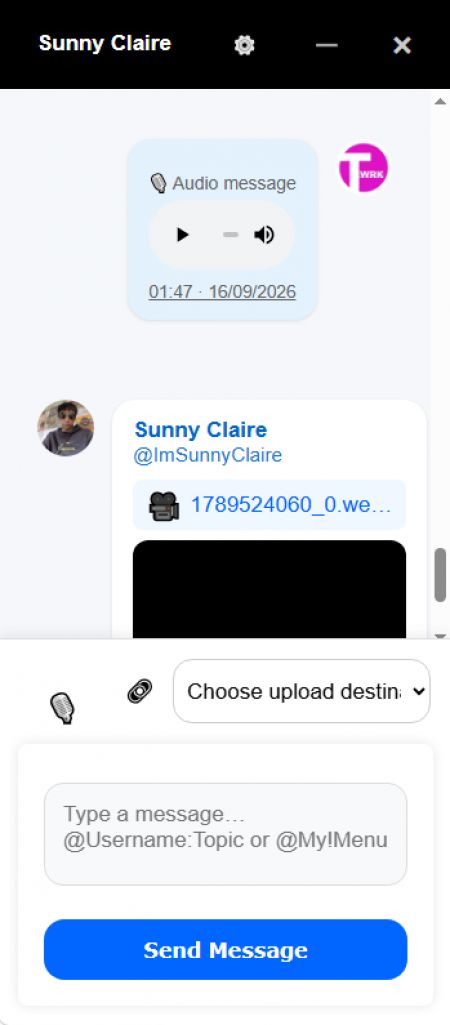
Messaging Composer
The existing messaging composer gains a microphone control positioned alongside the existing attachment controls.
Conceptually:
🎙️ 🔗 Message... Send
Users can record an Audio Chat directly from the messaging interface.
Recording
Browser recording uses the available media recording capabilities of the user's device/browser.
Once recording begins, the user can stop the recording and preview the pending audio before sending it.
Audio Without Text
An important part of the implementation is that an Audio Chat does
not require a text message.
A message can therefore consist entirely of:
🎙️ Audio Recording
rather than requiring:
Text + Audio Recording
This allows audio to behave as a genuine messaging format rather than merely as an attachment to text.
Direct Conversations
Audio can be recorded and sent inside ordinary one-to-one TXTWRK conversations.
Group Conversations
The same capability is available within group messaging.
The messaging architecture therefore becomes:
Messaging
│
├── Direct Chat
│ └── Audio Chat
│
└── Group Chat
└── Audio Chat
---
6. Messaging Audio Storage
Messaging Audio Chats also introduce selectable storage.
The
default storage destination is TXTWRK Data Balance.
A user with an appropriate Messaging API/server connection can instead choose to store Audio Chats on their connected server.
Default
Audio Storage:
TXTWRK Data Balance
This requires no additional server configuration.
Connected Server
Where suitable infrastructure has been configured:
Audio Storage:
My Messaging API Server
can be selected instead.
Conceptually:
Audio Chat
│
▼
TXTWRK
│
├────────► TXTWRK Data Balance
│
└────────► Messaging API / User Server
This allows users who operate their own infrastructure to preserve their TXTWRK data allowance by storing the underlying recording themselves.
---
7. TXTWRK Messaging Audio Storage Structure
TXTWRK-hosted Messaging Audio has been deliberately separated from the earlier Audio Room systems.
Its storage hierarchy is:
/1-audio-rooms-messaging/
{memberID}/
direct/
{chat_controller_id}/
audio_xxxxx.webm
group/
{group_id}/
audio_xxxxx.webm
This keeps:
•Post Audio Rooms
•Checklist Audio Rooms
•Messaging Audio Chats
separate at the storage level.
The implementations therefore do not need to interfere with one another simply because they all contain recorded audio.
---
8. Messaging Audio Data Accounting
When an Audio Chat is stored by TXTWRK, it consumes the appropriate user's TXTWRK data balance.
The recording therefore becomes part of the same broader storage economy as other TXTWRK-hosted data.
Where the user's own Messaging API server is selected instead, TXTWRK does not need to charge its own storage balance for the underlying audio object.
This creates a practical reason for users with their own infrastructure to connect it.
---
9. Audio Deletion and Ownership
Messaging storage also requires different deletion behaviour depending on where the media lives.
TXTWRK-Hosted Audio
Where TXTWRK owns the physical stored object, the system can manage:
•physical deletion;
•storage metadata;
•data accounting; and
•appropriate data refunds.
User-Server Audio
Where the audio resides on a user's connected server, TXTWRK should not treat that physical object as its own property.
Removing or hiding the TXTWRK message therefore does not mean TXTWRK should reach into the user's server and destroy the original media object.
Conceptually:
TXTWRK-hosted recording
↓
TXTWRK controls storage lifecycle
User-server recording
↓
Server owner controls storage lifecycle
This establishes a clearer ownership boundary between TXTWRK and connected infrastructure.
---
10. Protecting Private Messaging Audio
The TXTWRK Messaging Audio storage directory has also been treated separately from the earlier public Audio Room work.
The directory:
/1-audio-rooms-messaging/
can have its own
.htaccess protection.
The protection includes:
•directory indexing disabled;
•executable scripts blocked;
•unexpected file types blocked;
•MIME sniffing protection;
•direct/no-referrer requests rejected; and
•playback requests restricted to TXTWRK-originating pages under the current hotlink-protection model.
This protection applies
only to Messaging Audio.
The earlier Post and Checklist Audio Room directories are not changed by this Messaging-specific protection.
---
11. End-of-Day Audio Architecture
At the end of today's work, TXTWRK effectively has three different audio systems serving three different purposes.
This separation is important.
The goal has not been to create three copies of the same microphone feature.
Each implementation reflects its environment.
---
12. Social Audio
Post Audio Rooms represent the
social layer.
SOCIAL
│
▼
Post
│
▼
Audio Room
│
├── Host
├── Live / Offline
├── Join Requests
├── Accept / Block
├── Recording Limits
└── Playback
The conversation revolves around published content.
---
13. Work Audio
Checklist Audio Rooms represent the
work layer.
WORK
│
▼
Checklist
│
▼
Checklist Item
│
▼
Audio Room
│
├── Checklist Permissions
├── Recording
├── Topics
├── Date Organisation
├── Public Listening
└── Selectable Storage
The conversation revolves around a specific piece of work.
---
14. Private Audio
Messaging Audio Chats represent the
private communication layer.
PRIVATE
│
▼
Messaging
│
├── Direct
│ └── Audio Chat
│
└── Group
└── Audio Chat
The conversation revolves around private communication between users or groups.
---
15. One Audio Layer Across TXTWRK
Together, the three implementations can be viewed as:
TXTWRK AUDIO
│
┌───────────────┼───────────────┐
│ │ │
▼ ▼ ▼
SOCIAL WORK PRIVATE
│ │ │
POST CHECKLIST MESSAGING
│ │ │
AUDIO ROOM AUDIO ROOM AUDIO CHAT
│ │ │
Discussion Collaboration Conversation
This is a much broader development than simply adding voice messages.
Audio now has a place across three fundamentally different types of activity on TXTWRK.
---
16. Competitive Comparison — TXTWRK Audio Across the Network
Recorded audio itself is not unusual among modern communication networks.
Major messaging and collaboration platforms already provide various forms of:
•voice messages;
•recorded clips;
•voice channels;
•calls;
•meetings; and
•synchronous audio.
The more relevant comparison is therefore not:
"Does TXTWRK have audio?"
The more useful question is:
"Where can audio exist within TXTWRK, what is it attached to, who controls participation, and who controls its storage?"
That produces a considerably more interesting comparison.
---
17. Comparison With Other Major Networks
The comparison is not intended to suggest that other platforms lack sophisticated audio systems.
Several of them have extremely mature audio, calling, transcription, encryption and mobile experiences.
The distinction is the combination TXTWRK is developing.
---
18. Comparison With Messaging Networks
Platforms such as WhatsApp and Signal demonstrate the established value of asynchronous voice communication.
Voice recordings work naturally when users want to communicate something faster or more personally than typing a message.
TXTWRK Messaging now enters that same general category through Audio Chats.
However, TXTWRK's implementation also connects messaging audio to its wider infrastructure model.
A user can potentially choose between:
TXTWRK-hosted media
or:
User-hosted media
while continuing to use the same TXTWRK conversation.
The communication network and storage provider therefore do not necessarily have to be the same entity.
---
19. Comparison With Community Platforms
Discord demonstrates another model where audio extends beyond conventional private messaging.
Its ecosystem combines messaging with community-oriented voice functionality.
TXTWRK Post Audio Rooms approach community audio differently.
Instead of creating a voice channel that exists independently of a piece of content, the Audio Room belongs directly to a post.
Conceptually:
Traditional Community Voice
Community
↓
Voice Channel
↓
Conversation
TXTWRK Post Audio
Post
↓
Audio Room
↓
Conversation about that Post
The content itself becomes the location of the audio discussion.
---
20. Comparison With Workplace Platforms
Slack and Microsoft Teams demonstrate how recorded communication can become useful in professional collaboration.
Audio and video clips can reduce the need for synchronous meetings and allow information to be consumed asynchronously.
TXTWRK Checklist Audio Rooms approach the work context from the perspective of the
work item itself.
Instead of:
Channel
↓
Discussion
↓
User determines which task it concerns
TXTWRK can provide:
Checklist Item
↓
Audio Discussion
↓
Context already established
The recording is already attached to the object being discussed.
This reduces the separation between communication and the work itself.
---
21. Storage as an Architectural Difference
One of the most significant differences introduced during today's development is the ability to separate TXTWRK's application layer from the physical storage layer.
A conventional hosted network can broadly be represented as:
User
│
▼
Platform
│
▼
Platform-Controlled Storage
TXTWRK is developing another possibility:
User
│
▼
TXTWRK
│
├────────────► TXTWRK Storage
│
└────────────► User-Controlled Server
TXTWRK can remain responsible for:
•identity;
•permissions;
•conversations;
•checklist relationships;
•room metadata;
•interfaces; and
•application logic
while the physical media can, where supported, live somewhere selected by the user.
---
22. Data Balance or Infrastructure Ownership
This creates two different ways of consuming an audio service.
TXTWRK Data Balance
The simplest route is:
Record
↓
TXTWRK
↓
TXTWRK Storage
↓
Data Balance
No external infrastructure is required.
User Infrastructure
A user with their own compatible server can instead use:
Record
↓
TXTWRK
↓
Connected Server
↓
User-Controlled Storage
This can reduce consumption of the user's TXTWRK data balance while giving the server owner greater control over the underlying media object.
---
23. The Network and the Storage Do Not Have to Be the Same Thing
This is an important architectural principle emerging from the work.
Historically, users of a hosted social or messaging network generally expect:
Platform = Application + Communication + Storage
TXTWRK can increasingly operate as:
TXTWRK = Application + Communication + Coordination
while:
Storage = TXTWRK OR User Infrastructure
That distinction is now visible in both:
•Checklist Audio Rooms
•Messaging Audio Chats
and can potentially become relevant to additional TXTWRK services in the future.
---
24. Different Permission Models for Different Contexts
Another important outcome is that TXTWRK has not attempted to impose one permission model everywhere.
Post
A public/social Audio Room requires explicit moderation.
Visitor
↓
Join
↓
Host Accepts
↓
Record
Checklist
A collaborative work environment already knows who should have access.
Checklist User
↓
Existing Permission
↓
Record
Messaging
A private conversation already establishes participation.
Conversation Member
↓
Direct / Group Access
↓
Record and Send
These are three different solutions because they solve three different problems.
---
25. Why This Is More Than a Microphone Button
From the user's perspective, all three systems may contain a microphone.
Technically and architecturally, however, today's work encompasses much more.
It includes:
•room ownership;
•Live/Offline state;
•participation requests;
•acceptance;
•blocking;
•recording limits;
•checklist permissions;
•public listening;
•recording topics;
•filtering;
•date organisation;
•direct messaging;
•group messaging;
•audio-only messages;
•inline playback;
•TXTWRK storage;
•connected-server storage;
•data accounting;
•storage ownership;
•deletion behaviour; and
•protected private media directories.
The microphone is therefore only the visible entry point into a much larger system.
---
26. TXTWRK's Emerging Audio Model
The architecture can now be summarised as:
┌─────────────────────────────────────────────┐
│ TXTWRK AUDIO │
└─────────────────────────────────────────────┘
│
┌───────────────┼───────────────┐
│ │ │
▼ ▼ ▼
SOCIAL WORK PRIVATE
│ │ │
▼ ▼ ▼
POSTS CHECKLISTS MESSAGING
│ │ │
▼ ▼ ▼
AUDIO ROOMS AUDIO ROOMS AUDIO CHATS
│ │ │
├───────┬───────┴───────┬───────┤
│ │ │ │
▼ ▼ ▼ ▼
RECORD PLAYBACK TXTWRK OWN SERVER
STORAGE STORAGE
This creates a foundation that can be extended rather than requiring an entirely new audio architecture every time another part of TXTWRK needs recorded communication.
---
27. Areas Where Established Platforms Remain More Mature
A competitive comparison should also recognise where long-established communication platforms have mature capabilities that TXTWRK can continue developing.
Depending on the platform, these include areas such as:
•native mobile recording experiences;
•end-to-end encrypted media delivery;
•transcription;
•captions;
•accessibility;
•noise processing;
•waveform interfaces;
•playback-speed controls;
•large-scale media delivery;
•synchronous calling;
•large voice channels;
•sophisticated notification systems; and
•extensive moderation infrastructure.
The significance of today's TXTWRK development is therefore not a claim that every individual audio capability exceeds those of established networks.
The significance is the
combination and integration being developed.
---
28. TXTWRK's Combination
TXTWRK can increasingly be described as combining:
SOCIAL PUBLISHING
That combination is considerably more meaningful than treating Audio Rooms and Audio Chats as isolated features.
---
29. Today's Progress
At the beginning of this development path, Audio Rooms were associated primarily with posts.
The architecture now covers:
POSTS
│
▼
AUDIO ROOMS
CHECKLISTS
│
▼
AUDIO ROOMS
MESSAGING
│
▼
AUDIO CHATS
Each serves a different type of communication.
Posts provide
social discussion.
Checklists provide
work-related collaboration.
Messaging provides
private conversation.
---
30. End-of-Day Position — 16 September 2026
By the end of today's work, recorded audio has moved from being a feature within one area of TXTWRK toward becoming a capability of the wider network.
The architecture now supports the idea that audio can belong to:
•published content;
•a collaborative task;
•a direct conversation; or
•a group conversation.
At the same time, the infrastructure work introduces the principle that the media itself can potentially belong either to:
•TXTWRK storage; or
•infrastructure controlled by the user.
That gives TXTWRK an increasingly clear separation between
communication, context and storage.
The day's work can therefore be summarised simply:
>
Posts gained conversation through Audio Rooms.
>
>
Checklists gained contextual collaboration through Audio Rooms.
>
>
Messaging gained private recorded communication through Audio Chats.
>
>
And TXTWRK's audio architecture began moving beyond platform-only storage toward user-selectable infrastructure.
Not a bad day's work.























































































COMMUNITY
People