


Loading...
NOTIFICATIONS
Updates and activity
FILTER NOTIFICATIONS










































 LinkingFollowingConnectionsMessagesNotificationsSearchReelsCalendarMapsNotesNeedsContributionsTimetableIntelTo DosChecklistsSavesScrapboardLinksCoinsAdvertisingSubscriptionDonationLog BookBusinessAddressesInvestorFinancialsQuarterly'sSharesServerWorkspacePlaygroundAboutAIDDataDevImpressionsToolsEducationSafetyReader
TXTWRK Developer Hub is where communities, creators, teams and developers learn how to connect websites, servers, checklists, events, messaging, files, workspaces and long-term data tools into the TXTWRK platform.
TXTWRK currently organises its developer tools around 5 main API Kits: All Activity, Linking, Server, Events and Legacy Forever Data. Together they connect public community activity and events with websites, server-backed file access, messaging, workspace collaboration and long-term data continuity.
Powered by TXTWRK.com, this kit reads from the allActivities timeline and lets you control what your external channel is allowed to display. You can lock the channel to selected locations, show everybody or only your own activity, exclude selected member IDs, include only selected activity_name values, block content containing selected words, and set the earliest allowed activity date.
The public widget connects through https://txtwrk.com/system/core/api/allActivity/connect.php?all_api_id=YOUR_ID. The same endpoint can return JSON with &format=json.
This helps community websites route people back into TXTWRK activity, local discovery, profiles, places, posts and useful public information.
The Server API Kit brings directory and file access under server-level permissions rather than a separate Directory API Kit. Server owners can grant selected workers, contributors or users access to folders, uploads, checklist files and workspace-linked paths.
Server-connected tools also support workspace editing and collaboration, file access requests, and messaging access controls. Messaging may be dedicated to one page or account, or shared centrally, according to the server owner’s settings.
This supports local community discovery, upcoming events, world calendar style activity and public event visibility across connected websites, with location and date filtering.
This API Kit is designed to help keep profiles online after a service, platform or network ends, where the required settings have been enabled by participating networks and the data has passed review.
Where appropriate, TXTWRK may absorb selected network data to help maintain historical developments, public records and community continuity through routes such as txtwrk.com/network/name_of_network/@username.
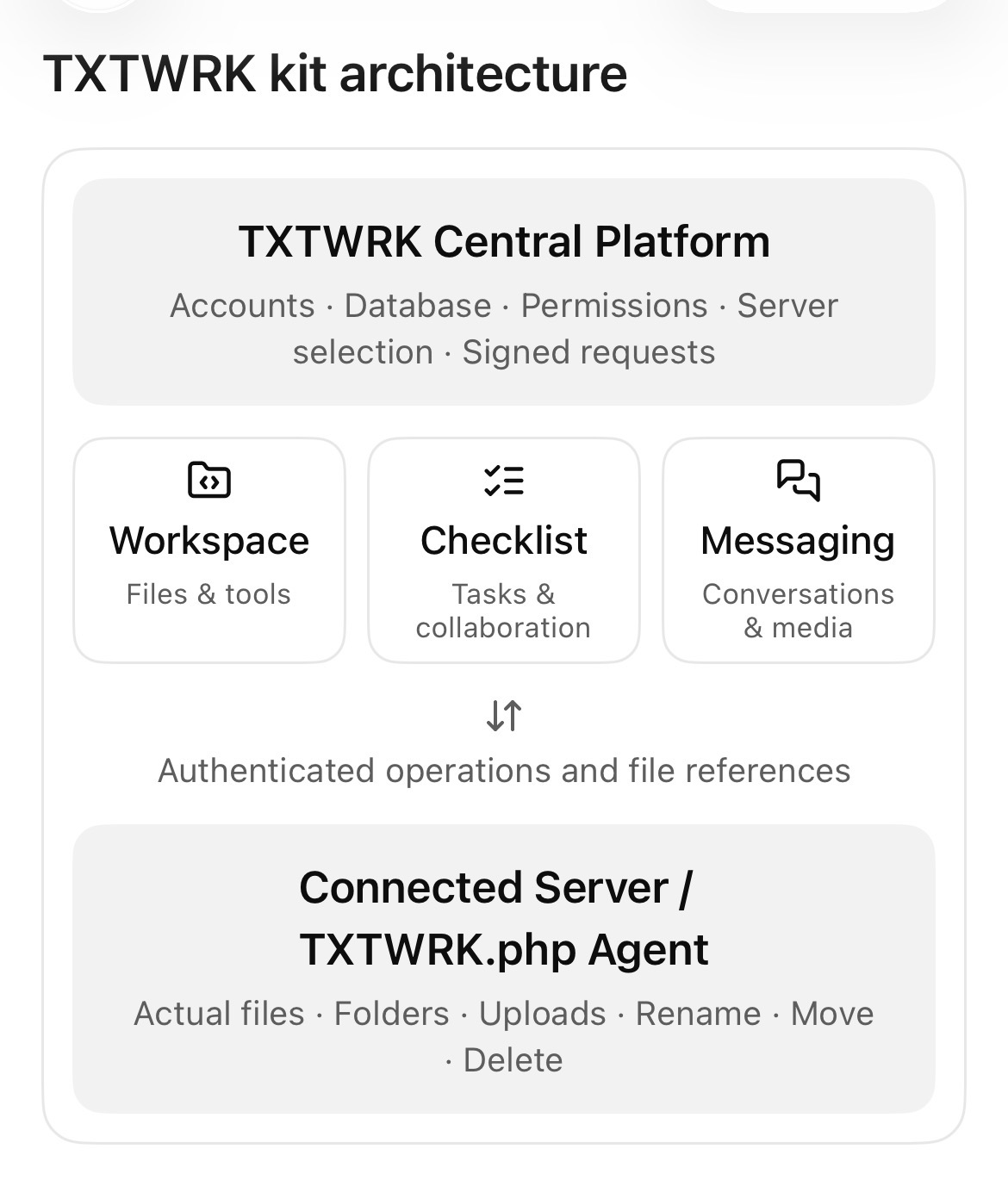
The Server API Kit now covers connected folders, files, access permissions and workspace-linked paths. Checklist storage can still be separated by server, domain or subdomain, without requiring a separate Directory API Kit.
Messaging can be centralised through TXTWRK or dedicated to a page or account, depending on the server owner's settings. Server-granted access lets workspace contributors work with the files and folders they have permission to use.
Server API Kit
  Connected server: owner-controlled
  Files and folders: selected granted paths
  Checklists: server-backed storage
  Workspace: editing and worker collaboration
  Messaging: dedicated or centralised, as configured

All Activity + Linking + Events
  Public activity, website connections and event discovery

Legacy Forever Data
  Participating network records and long-term continuity
TXTWRK connects public needs, checklists, files, servers, workers, messages, workspaces, events and long-term data into one system.
This allows people to move from an idea, to a checklist, to server files, to worker access, to workspace execution and completed public work.
Guidance and tools will continue to evolve as the platform grows. The five main API Kits provide the current developer overview, while messaging and workspace features remain available through their connected tools.
All Activity API Kit V1 — powered by TXTWRK.com.
Create one filtered public activity channel and reference it with its all_api_id.
The channel reads from allActivities first. Light joins are only used where useful for safe public presentation, member display data, location matching, or post privacy checks.
domain field so existing V1 records continue to work.
Public widgets open on today through the next 3 months, ordered by when the event happens. Events already in progress remain visible until their end time. Batches can be 5, 8 or 10.
| Creator | Event Details | Actions |
|---|
COMMUNITY
People