


































X

TXTWRK


PERSONAL
LinkingLinking
FollowingFollowing
ConnectionsConnections
MessagesMessages
NotificationsNotifications
DISCOVER
SearchSearch
ReelsReels
CalendarCalendar
MapMaps
Work
NotesNotes
NeedsNeeds
ContributionsContributions
TimetableTimetable
IntelIntel
To DosTo Dos
ChecklistsChecklists
SavesSaves
ScrapboardScrapboard
LinksLinks
Monetisation
CoinsCoins
AdvertisingAdvertising
SubscriptionSubscription
DonationDonation
Log BookLog Book
Organisation
BusinessBusiness
AddressesAddresses
InvestorInvestor
FinancialsFinancials
Quarterly'sQuarterly's
SharesShares
Server
ServerServer
WorkspaceWorkspace
Code PlaygroundPlayground
Learn More
AboutAbout
AIDAID
DataData
DevDev
Web ImpressionsImpressions
ToolsTools
EducationEducation
SafetySafety
ReaderReader
My Content
Profile Image
Login

My Addresses

×
Addresses
+
Character Profiles
+
Info & Cover
+
Timetables
+
Favorited by... X
Link Clicks X
All comments... X
More | 1/33

TXTWRK Verified Website

@TXTWRK

City of Derby, Derby, Derbyshire, East Midlands, England, United Kingdom, Europe

Our mission is to help people make text work in daily life. Get investment, volunteers, donations & more publicly…

Join the journey & make a profile to remember... Discover our investment opportunities via our card: @TXTWRK

We developed & support the @UnitedKingdom movement through #UnitedKingdom


Brand
12/01/2024
Learn more about me 𓇻
Donations: £2.50
▦ Photos
▦ Videos
▦ Covers
Applications
Questionnaires
Active: 51 minutes ago
Safety


OPENING TIMES
Show Images
Select a Store Location...
▼

Initializing schedule...

LOCAL PULSE

Profile Signals

Loading…
Loading profile signal…

Loading latest public Local Pulse signal…

Financials Financials
Quarterlys Quarterlys
Shares Shares
Notes Notes
Needs Needs
Contributions Contributions
Timetable Timetable
Intel Intel
To Dos To Dos
Notes Reel


Happening & Service
Happening Now and service updates connected to this profile


Happening in Offers
Offers available from this profile
Loading offers…


Connections
These are pages I added


Intel Pinned

Transparency of Operations
To make things even clearer, we are going to be updating our business registration in the coming days to 'TXTWRK Limited' in the UK & currently operate online in our startup phase, with workshops in educational institutions & community settings. We operate via the following domains: We monitise via the following sites: We operate the following social media: We operate the email addresses:
•Team@TXTWRK.com
•Support@TXTWRK.com
•Business@TXTWRK.com
•CommunityLibrary@TXTWRK.com
•Sponsors@TXTWRK.com
•Volunteer@TXTWRK.com
•Work@TXTWRK.com
•Writers@TXTRK.com
We operate the following TXTWRK pages: We operate the phone numbers: •447984582170 •0800 line coming soon We operate the following addresses:
•Currently in the process of setting up our office
•PO BOX coming soon & we focus on written communications
More intel:
•Need to request a removal from our Community Library, then simply email CommunityLibrary@TXTWRK.com
•Looking for account control, refer to ⚙ Settings/Linking to update your details or view https://txtwrk.com/account to understand your data or delete account
•We will never ask for your password or sensitive information and you should follow forms such as https://txtwrk.com/reset if you need to regain access to your account.
•We operate PayPal via our websites & also on TXTWRK
We keep this information up to date and concurrently here at TXTWRK via our intel reels - Last updated: 13/04/2026 00:16
Pinned Intel · 2026-04-12 23:14:46


Loading media...
DOUBLE TAP TO OPEN
+AI
+Analysis
•TXTWRK
+Assets
+Media
•Logos
+Standards
•Font
+Audio
•From Our Community
+Podcasts
+AI
•Insider Preview
+Language
•S1 E1 Psychology Research by @ImSunnyClaire
+Challenges
•Web Development
+Checklists
+Dev
•Business
•Server
•Web
•For Community
+Community Mentions
•Recognised as Stories
+Datasets
+Measurements
•Daily Common
+Documentation
•3D, AR & VR
+AI
•Checklists with AI
•Future Capabilities
•Insights
•Make Artistic Web Impressions
+Models
•Apple Intelligence
•Bing Copilot
•ChatGPT
•Claude
•IBM WatsonX
•Perchance
•Qwen
•TXTWRK AID
•Teaching
+Accessibility
•Feature Displayer
+Account Management
•Switch Accounts
•All Activity
+Assets
•Feedback
•Learn how to use assets
+Posting
•Set Projection
+Business
•Opportunities
+Checklists
•All Activity
•Applying
•Checklists Command Input 1.0
•Create
•Create Checklist with AI
•Directory API
•Engage
•Public Working
•Replicate
+Templates
•Starter Set
•Connect
+Data
•Account
•Cross Network Data API
•Directory
•Donations
+Feedback
•Streets
•TXTWRK Pulse
•Following
+Games
•Quiz
•Happening
+History
•In 1000 years
+Investors
+Crowdfunding
•Kickstarter
+Funding Rounds
•Funding Round 1
•Funding Round 2
•Funding Round 3
+Summary of Funding Rounds
•3 Core Funding Rounds
•Tools
+Labels
•Introduction
+Live
•Audio Rooms
+Location
•Addresses
+Management
•Future Proof
+Media
•3D Elements
•Record Audio
+Web Impressions
•Stickers
•Themes & Slideshows
•Messaging
•Monitisation
•Notifications
+Posting
•Prize Draws
•Transparency
+Progress
•Friday Weekly Updates
•In 1000 years
•TXTWRK Team
•Questions
•Reels
•Registration
+Safeguarding
•Covers of Education
•Logical Filters
•Our Safety Tools
•Search
+Selling
•Log Book & Types
+Server
•Connect to TXTWRK
•TXTWRK Servers
•Workspace
•Set Projection
+Shortcuts
•Posts
•Story Mode
+The Framework
•Language
•Tools
•Trending Topics
+Events
+April
•Easter
+December
•Christmas
•Hanukah
+March
•Eid Mubarak
•Seasons
+TXTWRK
•Annual
+Films
+From TXTWRK to Film
•Our Trail To Work
+Person of Interest X 2025
•Preview
+The Super 10
•Preview
+Learn How To
•Social Media
+Our Feedback
+Companies
+Alphabet Inc
•YouTube
•Facebook
+Partners
+AI
•Microsoft
+Educational
•Derby College
+People
+Digital
•Steve Jobs
+Role Models
•Questions
+Shop
+Digital
•NFT The Platinum Collection
+Subscriptions
+From TXTWRK
•Monthly Tiers
+United Kingdom
+Guidance
•Startups
+Podcasts
•S1 E1 The Start
+Work
+Startup
•Kids
+World
•Pledges
•Politics


@TXTWRK


Topic: News
⛶
Technology
Neutral
TXTWRK Servers

Infrastructure Development & Feasibility Report

October 2026 | Concept & Research Edition
TXTWRK — https://txtwrk.com

> Imagine a TXTWRK Server switched on by someone in your family today. A hundred years from now, that same server is still running, still connected and still contributing to the network. It may have needed maintenance, upgrades and periods of downtime, but the network kept working while it rested.

Built to outlast generations. Designed to evolve.

Executive Summary


TXTWRK proposes a new approach to digital infrastructure, combining accessible home servers, simplified software, partner integrations and an optional distributed computing network.

The initiative has two principal products:

ProductProposed Starting PricePurpose
TXTWRK Server OneFrom £1,000Home hosting for businesses and communities
TXTWRK Servers: Local Open ComputeFrom £3,000Server One capabilities plus distributed computing participation
Prices are preliminary development targets, not confirmed retail commitments.

The network begins as a hybrid of residential nodes, traditional data centers, cloud infrastructure and content delivery partners. Over time, more workloads may be distributed when technically and commercially feasible.

---

Part One — TXTWRK Servers


1. Product Vision


TXTWRK Servers are plug-and-play devices designed to help people establish and operate businesses, websites and communities from home.

The product prioritizes user experience. Customers should be able to connect their hardware, complete a guided setup and begin using their server without specialist systems administration knowledge.

Core Principles

•Plug-and-play installation.
•Locally controlled infrastructure.
•Preinstalled server software.
•A simple local management interface.
•Optional integration with txtwrk.com.
•Access to partner applications and services.
•Security, updates and backup support.
•Long-term maintainability and repairability.

2. User Experience


The intended setup journey is:

1. Unbox the TXTWRK Server.
2. Connect power and networking.
3. Open the local setup interface.
4. Configure administrator access and security.
5. Optionally connect a TXTWRK account.
6. Configure domains, applications and services.
7. Launch a website, community or business platform.

The local interface should remain useful even when TXTWRK's central platform is temporarily unavailable.

3. Software Architecture


LayerFunction
Local interfaceDevice management, storage, applications and networking
TXTWRK platformAccounts, domains, licensing, support and partner integrations
Partner servicesWebsite builders, management panels, security and backup
Server operating environmentHosting, containerization, updates and monitoring
Network servicesOptional connectivity to the wider TXTWRK ecosystem
TXTWRK can investigate integrations with established software such as cPanel, open-source management tools and future applications created by independent developers.

4. Hardware Requirements


ComponentProposed Requirement
CPUEfficient multicore processor
RAMExpandable memory
StorageSSD-based system and application storage
NetworkingReliable Ethernet connectivity
SecuritySecure boot, encryption and authenticated identity
CoolingEfficient, maintainable cooling
PowerLow idle consumption and safe shutdown
ConstructionRepairable and replaceable components
SoftwarePreinstalled TXTWRK environment
Final specifications must be established through workload testing and manufacturing research.

5. Commercial Positioning


Proposed starting price: £1,000.

The objective is to provide accessible infrastructure for individuals, startups and communities.

The price is an initial target. Manufacturing costs, taxes, support, warranties and commercial viability remain to be validated.

---

Part Two — TXTWRK Servers: Local Open Compute


6. Concept


Local Open Compute extends TXTWRK Server One by providing additional resources for participation in a coordinated distributed computing network.

The enhanced product includes the capabilities of Server One and additional storage, processing and networking capacity.

Customers can operate their own services while optionally contributing agreed resources to the wider network.

7. Resource Allocation


The initial concept proposes 1 TB of dedicated Local Open Compute storage per participating device, separate from personal or business storage.

ResourceInitial AllocationPurpose
Total dedicated network storage1 TBDistributed network participation
CDN-style cache100 GBFrequently requested content
Remaining storage900 GBOther approved network storage workloads
CPUTo be specifiedIndependent processing tasks
GPUModel-dependentSupported accelerated workloads
BandwidthManaged allocationNetwork delivery and resource sharing
Allocations may change according to demand, contractual agreements and the resource limits accepted by participants.

Actual usable storage will be lower after operational overhead.

8. Network Architecture


TXTWRK proposes a hybrid infrastructure combining:
•Independently owned home servers.
•TXTWRK network coordination services.
•Partner cloud infrastructure.
•Traditional data centers.
•CDN providers.
•Regional storage and processing nodes.

The coordination system would allocate workloads according to location, availability, performance, security and cost.

The network should initially focus on workloads that do not require extremely low-latency communication between distributed machines.

9. Local Content Distribution


Popular files could be replicated across approved nodes in relevant geographic regions.

For example, a UK business could have suitable static assets cached on several participating servers serving different locations.

The network would need to account for:
•Content popularity and geographic demand.
•Node availability and upload capacity.
•Network routing and latency.
•Storage replication and consistency.
•Security and encryption.
•Bandwidth usage and partner agreements.

Residential nodes would complement conventional CDNs where measurements show an advantage.

Geographic proximity alone does not guarantee improved performance.

10. Distributed Compute


Potential workloads include:
•Independent CPU processing.
•Batch processing.
•AI inference requests.
•Selected GPU workloads.
•Media processing.
•Distributed storage and caching.
•Background application jobs.

Large-scale AI training may remain better suited to specialized data centers because of the high-speed communication requirements between GPUs.

TXTWRK should investigate compute workloads through research and controlled benchmarks before making performance commitments.

11. Bandwidth and Network Coordination


TXTWRK and participating partners would establish mutually agreed network policies.

These would govern:
•Resource allocation.
•Bandwidth commitments.
•Workload scheduling.
•Service quality.
•Node eligibility.
•Network monitoring.
•Security and compliance.

Participants should have clear visibility into resource commitments and the ability to manage participation within agreed terms.

12. Credits and Compensation


Participating owners could earn TXTWRK credits for verified resource contributions.

MechanismProposed Approach
Storage contributionsReward verified useful capacity and availability
Compute contributionsReward successfully completed workloads
Bandwidth contributionsReward approved data delivery
CompensationTXTWRK credits
RedemptionOptional periodic cash settlement
Settlement frequencyQuarterly, six-monthly or another agreed interval
The commercial model must account for electricity, connectivity, operating costs, taxes, fraud prevention and service reliability.

No financial return is guaranteed.

13. Security


The network should use defense-in-depth security.

Proposed measures include:
•Secure boot and signed updates.
•Encrypted storage and network traffic.
•Authenticated node identities.
•Workload isolation.
•Remote attestation where supported.
•Tamper detection.
•Compromise monitoring.
•Automated quarantine and service migration.

A physical tamper event could generate a report to trusted infrastructure or nearby nodes, but this must not be treated as proof that a compromised device can reliably report its own condition.

14. Reliability and Failover


The network should tolerate individual devices going offline for maintenance, cooling, hardware failure or connectivity interruptions.

Potential techniques include:
•Replicated storage.
•Erasure coding.
•Redundant service execution.
•Health monitoring.
•Automated failover.
•Planned workload migration.
•Backup and recovery.

A node may temporarily stop operating while another eligible node handles its supported workload.

Availability guarantees will depend on redundancy and tested recovery procedures.

15. Hybrid Infrastructure


TXTWRK will initially depend on a combination of residential infrastructure and conventional providers.

Traditional data centers remain important for:
•Central coordination.
•High-bandwidth workloads.
•Critical services.
•Large GPU clusters.
•Disaster recovery.
•Regional connectivity.

Long-term research may investigate greater network independence, but independence is not required for the initial commercial model.

---

Part Three — Sustainability and Product Longevity


16. Long-Term Device Support


TXTWRK proposes a development culture based on durability rather than frequent hardware replacement.

New product editions may be introduced approximately every three to five years.

Older devices should remain compatible with supported network functions wherever feasible.

The ambition is to maintain useful participation for decades through updates, repairs and changing workload assignments.

17. Hardware Repurposing


Older nodes may transition to less demanding responsibilities.

Device ConditionPotential Role
New high-performance deviceAdvanced applications and compute
Mature deviceGeneral hosting and distributed storage
Older compatible deviceCaching and lightweight processing
Limited-capacity deviceMonitoring or other low-demand services
Unsupported or unsafe deviceRetirement, refurbishment or recycling
A century-long service life is an aspiration for continuity and maintainability, not a guarantee that original components will operate indefinitely.

18. Buyback and Recycling


TXTWRK may develop a buyback program to support upgrades and responsible reuse.

Returned devices could be:
•Inspected and refurbished.
•Reassigned to educational projects.
•Redeployed for lighter workloads.
•Used for spare parts.
•Recycled when continued operation is no longer viable.

Energy consumption, repair costs and cybersecurity support must determine whether continued operation is practical.

---

Part Four — Research and Partnerships


19. Collaborative Development


TXTWRK intends to develop the initiative with industry specialists, technology partners, independent researchers and volunteers.

Research areas include:
•Server hardware and manufacturing.
•Networking and connectivity.
•Distributed storage.
•GPU and CPU scheduling.
•Cybersecurity.
•Energy efficiency.
•Application integration.
•Customer experience.
•Resource accounting.

Volunteer research should have clear expectations, appropriate recognition and genuine educational value. Commercial operational responsibilities require appropriate resourcing.

20. Partner Opportunities


Partner CategoryPotential Contribution
Hardware manufacturersComponents and modular server designs
Hosting companiesDomain services and management tools
Network operatorsConnectivity and routing expertise
Cloud providersHybrid compute and storage
CDN operatorsContent delivery integration
Security companiesDevice trust and threat protection
UniversitiesResearch and independent testing
Software developersApplications and platform integrations
These represent potential collaborations rather than confirmed partnerships.

---

Part Five — Network Capacity and Economics


21. Illustrative Storage Growth


Assuming each participating Local Open Compute server contributes 1 TB of raw dedicated storage:

Participating ServersRaw Network StorageCDN Cache Allocation
100100 TB10 TB
1,0001 PB100 TB
10,00010 PB1 PB
100,000100 PB10 PB
1,000,0001 EB100 PB
These figures are theoretical and exclude replication, redundancy, offline devices, metadata and operational reserves.

They are not customer acquisition or deployment forecasts.

22. Economic Requirements


The commercial feasibility model must evaluate:
•Hardware manufacturing costs.
•Product distribution and warranty costs.
•Electricity consumption.
•Residential internet limitations.
•Network coordination expenses.
•Customer support.
•Security operations.
•Partner revenue sharing.
•Resource compensation.
•Real customer demand.

Network participation must create sufficient value to justify its operating costs.

23. Principal Technical Challenges


ChallengeResearch Response
Residential upload limitationsBenchmarking and workload selection
Dynamic IP addresses and NATSecure tunnels and connectivity services
Unreliable nodesRedundancy and automated recovery
Hardware differencesStandardized compatibility profiles
Data securityEncryption and isolation
Network economicsUsage metering and resource accounting
Electricity costsEnergy-efficient scheduling
Long-term supportModular design and compatibility policies
Legal complianceData protection and regulatory assessment
---

Part Six — Development Roadmap


24. Proposed Development Phases


PhaseObjectivePrincipal Deliverable
1Product definitionUser experience and hardware requirements
2Standalone prototypeWorking TXTWRK Server
3Platform integrationTXTWRK account and partner connectivity
4Distributed researchSmall Local Open Compute test network
5Pilot deploymentReliability and performance measurements
6Commercial validationManufacturing and economic assessment
7Controlled expansionAdditional models and network growth
No fixed launch dates are established in this report.

25. Research Milestones


Before a wider launch, TXTWRK should demonstrate:

1. A working plug-and-play standalone server.
2. Reliable local hosting and management.
3. Secure TXTWRK platform integration.
4. A small distributed storage network.
5. Tested failover and node recovery.
6. Verified bandwidth and compute accounting.
7. Measurable energy and operating costs.
8. A commercially viable support and compensation model.

---

Part Seven — Industry Opportunity


26. Reusing Established Technologies Differently


TXTWRK is not claiming to invent distributed computing, edge hosting, failover or CDN technology.

The proposal is to combine established technologies into a more accessible, integrated product ecosystem.

The innovation opportunity lies in:
•Making home infrastructure approachable.
•Connecting owned servers to useful services.
•Enabling optional distributed participation.
•Creating an accessible partner ecosystem.
•Supporting long-term hardware use.
•Developing sustainable resource compensation.
•Making infrastructure education part of the product experience.

The objective is to revisit barriers that have historically limited adoption and test whether new hardware, software and network approaches can overcome them.

27. Supporting UK Startups


TXTWRK aims to make infrastructure ownership a practical option for UK entrepreneurs and community organizations.

The long-term ambition includes reaching a potential market of millions of new and existing businesses.

This represents a strategic aspiration rather than a verified market forecast.

28. Criteria for Success


TXTWRK should measure success through:
•Customer ease of use.
•Service reliability.
•Hardware longevity.
•Security.
•Economic sustainability.
•Partner participation.
•Network utilization.
•Environmental performance.
•Accessibility to small organizations.

The project should progress from working prototypes and measured evidence rather than assuming that theoretical capacity automatically produces commercial value.

---

Conclusion


TXTWRK Servers and TXTWRK Servers: Local Open Compute represent two interconnected initiatives.

Part One enables individuals, communities and businesses to operate their own digital infrastructure through accessible home server hardware and integrated software.

Part Two investigates how independently owned devices can contribute to a wider distributed computing network.

The network begins as a hybrid system, combining home infrastructure with established hosting, cloud and data center services.

Its long-term direction emphasizes sustainability, maintainability, local ownership and collaborative innovation.

The technical and commercial challenges are significant. Success will require partnerships, prototypes, research and measured validation.

TXTWRK's objective is to make digital infrastructure accessible today while developing a network capable of evolving for generations.

---

Founding Principle


> Build locally. Connect globally. Last for generations.

A server should not be defined only by the day it was manufactured, but by the value it can continue providing to the people and networks that depend on it.

---

Document Status: Initial Concept and Feasibility Report

Organization: TXTWRK

Website: https://txtwrk.com

Date: October 2026

Commercial Status: Proposed product concepts, indicative starting prices and research objectives. Specifications, performance, partnerships and release plans remain subject to validation.

Let’s work together @Meta & @XAI


⛶
Technology
Neutral
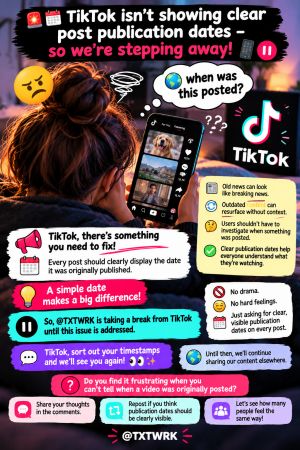
🚨📅 TikTok isn’t showing clear post publication dates — so we’re stepping away! 📱⏸️

👀 TikTok, there’s something you need to fix!

📅 Every post should clearly display the date it was originally published.

📰 Old news can look like breaking news.

🔄 Outdated content can resurface without context.

🤔 Users shouldn’t have to investigate when something was posted.

✅ Clear publication dates help everyone understand what they’re watching.

💡 A simple date makes a big difference!

👋 So, @TXTWRK is taking a break from TikTok until this issue is addressed.

🚫 No drama.

😌 No hard feelings.

📅 Just asking for clear, visible publication dates on every post.

💬 TikTok, sort out your timestamps and we’ll see you again! 👀✨

🌍 Until then, we’ll continue sharing our content elsewhere.

🤔 Do you find it frustrating when you can’t tell when a video was originally posted?

💬 Share your thoughts in the comments.

🔄 Repost if you think publication dates should be clearly visible.

📢 Let’s see how many people feel the same way!

💙 @TXTWRK

#TXTWRK #TikTok #ShowTheDate #DigitalTransparency #ContentAccountability

🗖 VIEW

⛶
Technology
Neutral
TXTWRK — FULL DEVELOPMENT & API CONSOLIDATION REPORT


Report Date: 13 October 2026
Project: TXTWRK
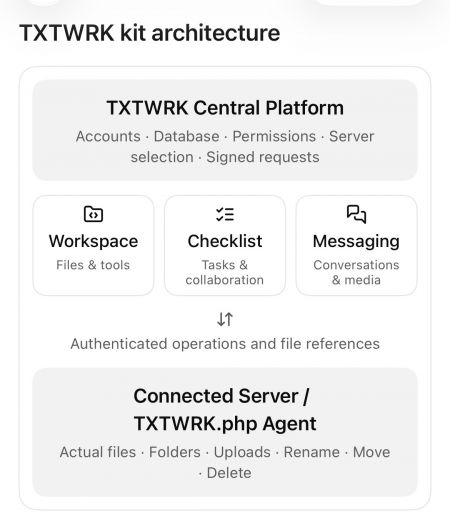
Subject: Original Directory API Kit, Server API Kit and Messaging API Kit compared with the consolidated Workspace, Checklist and Messaging platform.

---

1. EXECUTIVE SUMMARY


TXTWRK began with three principal API kits:

1. Directory API Kit
2. Server API Kit
3. Messaging API Kit

The objective was to consolidate these technologies into one connected infrastructure that would allow users to manage files, communicate, collaborate and use their own Connected Servers for storage.

The project has progressed from individual API capabilities into a broader platform consisting of:
•Connected Server infrastructure
•Workspace file management
•Checklist collaboration
•Messaging and private media
•Shared filesystem operations
•Centralised access control
•Attachment reference synchronisation
•Media processing and thumbnails
•Integrated directory viewers
•Mobile-responsive overlays

The most important achievement is the separation of storage, identity, permissions and collaboration records while allowing these systems to operate together.

The remaining development concerns primarily involve file-reference integrity, deletion handling, thumbnail synchronisation and complete cross-kit verification.

---

2. ORIGINAL DIRECTORY API KIT


Original Purpose


The Directory API Kit provided the foundation for managing files and folders through TXTWRK.

Its responsibilities included:
•Browsing directories
•Listing files and folders
•Creating files
•Creating folders
•Uploading files
•Downloading files
•Renaming files and folders
•Moving files and folders
•Deleting files and folders
•Accessing authorised server directories

Development Progress


The Directory API functionality has been integrated into both Workspace and Checklist.

Workspace provides general-purpose file management.

Checklist provides a more restricted directory experience associated with a particular Checklist, its selected Connected Server and its participants.

Current Architecture


The Directory API is no longer best understood as a completely independent user-facing feature.

It provides reusable filesystem functionality that other TXTWRK kits consume.

Assessment


Status: Implemented and integrated.

Additional work remains to ensure deletion and reference synchronisation behave consistently across every consuming feature.

---

3. ORIGINAL SERVER API KIT


Original Purpose


The Server API Kit established the connection between TXTWRK Central and a user's Connected Server.

Its responsibilities included:
•Server registration
•Server verification
•Remote agent installation
•Server identification
•Secret-based authentication
•Signed API requests
•Remote filesystem operations
•Server ownership and permissions

Server Verification


The original verification process was designed to confirm that:

1. /TXTWRK.php was installed.
2. The server executed PHP correctly.
3. The remote agent possessed the expected secret.
4. The server identified itself correctly.
5. The server supported the required TXTWRK protocol.

Server URLs and secrets were resolved centrally rather than accepted directly from browser input.

Consolidated Architecture


The Connected Server model now supports multiple application features.

The general request flow is:

TXTWRK Interface
↓
TXTWRK Central API
↓
Session and Permission Validation
↓
Connected Server Selection
↓
Signed API Request
↓
Customer's /TXTWRK.php Agent
↓
Filesystem Operation
↓
Operation Result
↓
TXTWRK Central

The central API uses signed requests incorporating a timestamp, nonce and HMAC-SHA256 authentication.

Development Achievement


The Server API provides a common infrastructure for:
•Workspace operations
•Checklist directories
•Messaging media storage
•Authorised file access
•Remote uploads and downloads

Assessment


Status: Core architecture implemented.

Complete security and production-readiness verification still requires end-to-end testing.

---

4. ORIGINAL MESSAGING API KIT


Original Purpose


The Messaging API Kit was designed to provide private communication while allowing users to store media through Connected Servers.

The original concept included:
•Personal conversations
•Group conversations
•Private file sharing
•Server-backed media uploads
•Multimedia previews
•Downloadable attachments
•User-controlled storage capacity

Consolidated Messaging Architecture


Messaging now participates in the common Connected Server model.

The reviewed central gateway supports:
•Personal Messaging identity
•Delegated @MessagingAccess identity
•Accepted Messaging Access grants
•Group upload authorisation
•Direct-message upload authorisation
•Server-backed media storage

Important Architectural Separation


Messaging identity and storage entitlement are not the same thing.

A user may be authorised to store files on a particular Connected Server without representing that server owner's Messaging identity.

This allows TXTWRK to distinguish:

Who is communicating?

from:

Which Connected Server may store the files?

Assessment


Status: Shared storage authorisation implemented.

The complete Messaging attachment lifecycle still requires verification, particularly Rename, Move, Delete and database-reference consistency.

---

5. WORKSPACE KIT


Purpose


Workspace is TXTWRK's general-purpose file-management and working environment.

It uses the Connected Server infrastructure to perform authenticated filesystem operations.

Implemented Functionality

•Directory browsing
•File and folder listing
•File creation
•Folder creation
•Uploads
•Downloads
•Rename
•Move
•Delete
•File editing
•File versions
•Edit locks
•File ownership checks
•Edit requests
•ZIP compression
•ZIP extraction
•Delegated File Access
•Checklist integration

Original Compatibility


The early Workspace implementation preserved the existing manage.php action contract.

This allowed the original browser interface to continue functioning while filesystem operations were routed through the Connected Server agent.

Checklist Integration


Workspace became aware of Checklist file relationships.

When supported Checklist files or directories are moved, the Workspace implementation can invoke central reference synchronisation.

This is important because files are no longer treated solely as independent filesystem objects.

They may also be attachments belonging to Checklist comments, replies or Threadlets.

Assessment


Status: Implemented with substantial integration.

Remaining work concerns consistency after deletion, partial failures and cross-feature reference updates.

---

6. CHECKLIST KIT


Purpose


Checklist provides task-oriented collaboration connected to files, participants and discussions.

Core Functionality

•Checklist creation and organisation
•Checklist items
•Grouped items
•Item navigation
•Checklist overlays
•Applications
•Apply Now
•Active participants
•Comments
•Replies
•Threadlets
•Connected files
•Member directories
•File viewers
•Activity information

Connected Server Integration


Each Checklist can be associated with a selected Connected Server.

The directory system operates within the Checklist's authorised context.

The later gateway implementation checks the relationship between:
•Checklist ID
•Server ID
•Checklist owner
•Active participant
•Requested member directory

This helps prevent Checklist directory access from becoming unrestricted Workspace access.

Comments and Replies


The discussion system supports attached files and richer content.

The reviewed work includes:
•Comment attachments
•Reply attachments
•File listings
•Image previews
•Video previews
•Thumbnail handling
•Formatting controls
•Comment sorting
•Reply interactions
•Web Impression content

Threadlets


Threadlets extend Checklist conversations with nested discussion.

Development work included:
•Nested Threadlet presentation
•New Threadlet controls
•Connected file lists
•Image and video attachments
•Primary media previews
•Thumbnail handling
•Pagination
•Mobile indentation
•Visual discussion boundaries

Threadlet attachments use an independent database structure, including threadlet_media_files.

Mobile Development


Recent work addressed:
•Safari overlay scrolling
•Background-page scroll interference
•Checklist scroll-container targeting
•Apply Now navigation
•Dynamic comment viewers
•Web Impression display
•Threadlet presentation

The revised Apply Now behaviour was reported working after testing.

Assessment


Status: Broad functionality implemented and actively refined.

Some attachment lifecycle and interface interactions still require comprehensive regression testing.

---

7. API CONSOLIDATION ARCHITECTURE


The consolidated architecture can be represented as:

TXTWRK CENTRAL
│
├── Server Management
│ ├── Server registration
│ ├── Verification
│ ├── Stored credentials
│ └── Signed communication
│
├── Workspace Kit
│ ├── File management
│ ├── File editing
│ ├── File permissions
│ └── Checklist integration
│
├── Checklist Kit
│ ├── Items and groups
│ ├── Applications
│ ├── Comments and replies
│ ├── Threadlets
│ ├── Connected files
│ └── Member directories
│
├── Messaging Kit
│ ├── Personal identity
│ ├── Delegated identity
│ ├── Group/direct messaging
│ └── Server-backed media
│
├── Shared Authorisation
│ ├── Server ownership
│ ├── File Access
│ ├── Checklist membership
│ └── Messaging Access
│
└── Shared File Reference Management
├── Comment references
├── Reply references
└── Threadlet references
│
▼
CONNECTED SERVER
│
└── /TXTWRK.php
├── Files
├── Folders
├── Uploads
├── Downloads
├── Rename
├── Move
└── Delete

This represents the logical architecture visible in the reviewed code. It does not imply that every component has been consolidated into one physical PHP file.

---

8. FILE REFERENCE SYNCHRONISATION


One of the most important later developments was central attachment-reference synchronisation.

Purpose


When a file or directory changes location, TXTWRK must preserve the relationship between that file and the content referencing it.

Current Implementation


The reviewed function is:

txtwrkSyncConfirmedMoves()

It is designed to run after the Connected Server confirms a Rename or Move operation.

Database Tables


Checklist Comments


Table:

post_c_comment

Fields:
•file_connected_array
•thumbnail

Checklist Replies


Table:

checklist_reply_uploads

Field:
•file_location_name

Threadlets


Table:

threadlet_media_files

Fields:
•relative_path
•original_name

Server Isolation


Reference updates are scoped to the selected Connected Server.

This prevents an operation on one server from indiscriminately updating matching paths belonging to another server.

Example


Original attachment:

/opensource/system/checklists/user_i/files/photo.jpg

Renamed attachment:

/opensource/system/checklists/user_i/files/new-photo.jpg

After a confirmed Rename operation, the synchronisation function can update the relevant stored references.

Current Limitations


The reviewed implementation does not fully establish:
•Reference cleanup after Delete
•Synchronisation of Threadlet thumbnail_path
•Complete Messaging attachment synchronisation
•Automatic recovery from partial failures

Assessment


Status: Rename/Move synchronisation implemented for reviewed Checklist attachment structures.

Deletion and broader lifecycle consistency remain unfinished or unverified.

---

9. ORIGINAL CODE VERSUS CURRENT DEVELOPMENT


CapabilityOriginal FoundationDeveloped System
Directory APIGeneral filesystem operationsIntegrated Workspace and Checklist file management
Server APIConnect and verify serversShared Connected Server infrastructure
Messaging APIPrivate communication and mediaIntegrated storage authorisation
WorkspaceExisting file-management actionsConnected Server routing and Checklist integration
ChecklistItems, comments and repliesDirectories, richer media and Threadlets
AuthenticationSigned server requestsAdditional feature-specific permission checks
AttachmentsFeature-specific stored pathsCentral Rename/Move synchronisation
MediaExisting uploads and previewsExpanded thumbnail and video handling
Mobile UIExisting responsive controlsTargeted overlay and scrolling corrections
The original system already contained substantial functionality.

Later work should therefore be described primarily as consolidation, integration, extension and refinement rather than the creation of every capability from nothing.

---

10. SECURITY AND ACCESS CONTROL


The reviewed architecture includes several protection layers.

Connected Server Security

•Server verification
•Server ID checks
•Stored server secrets
•Signed requests
•Timestamp and nonce handling

Workspace Security

•Server ownership checks
•File Access permissions
•Allowed folders
•Allowed files
•Path validation

Checklist Security

•Checklist ID validation
•Server association
•Owner/participant checks
•Member directory restrictions

Messaging Security

•Messaging Access grants
•Delegated identity handling
•Group upload authorisation
•Direct-message upload authorisation
•Separation of identity and storage entitlement

Remaining Security Work

•End-to-end authorisation testing
•Cross-server isolation tests
•Path traversal testing
•Partial-operation recovery
•Destructive-operation permission checks
•Consistent error handling

Assessment


Status: Multiple security layers implemented.

A complete production security audit has not been established from the available files.

---

11. DEVELOPMENT PROGRESSION


Phase 1 — Original API Foundation


Established:
•Directory API
•Server API
•Messaging API
•Connected Server verification
•Remote filesystem communication

Phase 2 — Backend Consolidation


Developed:
•Shared Connected Server communication
•Signed operations
•Central server selection
•Permission routing
•Workspace compatibility

Phase 3 — Workspace Integration


Expanded:
•Remote file management
•File editing
•File locks
•Versions
•Archive operations
•Delegated File Access

Phase 4 — Checklist Integration


Developed:
•Checklist-selected Connected Servers
•Participant directories
•Connected file management
•Comment and reply attachments
•Directory viewers

Phase 5 — Collaboration Expansion


Refined:
•Threadlets
•Connected media
•Video thumbnails
•Web Impressions
•Nested discussion presentation

Phase 6 — Reference Synchronisation


Implemented:
•Comment attachment path updates
•Reply attachment path updates
•Threadlet attachment path updates
•Server-scoped Rename/Move synchronisation

Phase 7 — Interface Refinement


Addressed:
•Mobile Safari scrolling
•Overlay behaviour
•Apply Now navigation
•Dynamic viewers
•Threadlet layout
•Pagination interactions

Phase 8 — Current Consolidation Completion


Outstanding priorities:
•Safe deletion handling
•Thumbnail-path synchronisation
•Messaging reference verification
•Consistent operation results
•Cross-kit regression testing
•Security and failure-recovery testing

---

12. CURRENT DEVELOPMENT STATUS


SystemAssessment
Connected Server infrastructureImplemented
Server verificationImplemented
Signed API requestsImplemented
Directory API integrationImplemented
Workspace file operationsImplemented
Checklist directoriesImplemented
Checklist comments/repliesImplemented
ThreadletsImplemented
Media and thumbnailsImplemented with remaining path-consistency work
Messaging storage authorisationImplemented in gateway
Checklist Rename/Move reference syncImplemented
Delete reference protectionIncomplete or unverified
Threadlet thumbnail-path syncIncomplete
Complete Messaging attachment lifecycleNot fully verified
Cross-kit integration testingNot established
Production security auditNot established
These assessments refer to reviewed source code and reported testing, not measured percentages of completion.

---

13. REMAINING DEVELOPMENT PRIORITIES


Priority 1 — Attachment Deletion


Establish a consistent policy for deleting files still attached to comments, replies or Threadlets.

Recommended approach:

Block deletion while active references exist, unless an explicit attachment-removal workflow is used.

Priority 2 — Threadlet Thumbnails


Synchronise or invalidate thumbnail_path when the corresponding media is renamed or moved.

Priority 3 — Messaging Integration


Verify Messaging file-reference behaviour against the same lifecycle standards used for Checklist attachments.

Priority 4 — Shared API Responses


Standardise operation responses across controllers and the Connected Server.

Avoid forcing success = true when the remote operation has failed.

Priority 5 — Cross-Kit Testing


Test complete workflows involving multiple kits.

Example:

1. Upload a file through Checklist.
2. Attach it to a comment.
3. Open it through Workspace.
4. Rename it.
5. Confirm the comment still opens it.
6. Move its parent directory.
7. Confirm the reference updates.
8. Attempt deletion.
9. Verify the selected deletion policy is enforced.

Priority 6 — Stability


Preserve existing user interfaces and controls while strengthening the shared backend.

Avoid creating additional parallel APIs for operations already supported by the consolidated infrastructure.

---

14. FINAL ASSESSMENT


The original TXTWRK architecture began with:

DIRECTORY API KIT

The developed architecture now consists of:

TXTWRK CENTRAL

The central architectural achievement is that file storage, user identity, authorisation and collaboration records can remain separate while operating through common infrastructure.

Workspace manages files.

Checklist organises work and associates files with collaborative discussions.

Messaging provides private communication and authorised media storage.

The Server API establishes trusted communication with Connected Servers.

The Directory API supplies reusable filesystem operations.

The consolidation layer connects these responsibilities.

Overall Conclusion


TXTWRK has progressed substantially beyond its original three-kit foundation.

It now represents an integrated platform for connected storage, file management, collaborative Checklist work and Messaging.

The next development milestone is not another independent API Kit.

It is completing the consistency of the existing consolidated architecture across every file operation, permission boundary and attachment relationship.

The foundation is implemented. The remaining challenge is complete cross-kit reliability and verification.

---

REPORT SCOPE


This report is based on:
•Original API source files shared in the conversation
•Subsequent Workspace and Checklist implementations
•Connected Server gateway and runtime code
•Messaging-related gateway code
•Reference synchronisation functions
•Threadlet and media-related development
•Interface changes and reported testing

It does not constitute a live production audit, a complete line-by-line diff of every revision or confirmation that every generated replacement file has been deployed.

1/6
🗖 VIEW
⛶
🍂 Autumn 2026 🍁
2026-09-23 01:05:00
2026-09-18 20:50:00
Location: Globally

Attend
Community
Neutral
Yes. I’d keep the broad Autumn 2026 / 100 events concept, but make the opening more action-led, turn the calendar into one clean Event | Date table, and expand the science into daylight, energy/routine and adaptability.

Here is the revised copy for the TXTWRK page:

🍂 AUTUMN 2026 — 100 EVENTS, IDEAS & THINGS TO DO 🍂

•Get your event ready
•Craft your Halloween Now
•Prepare for Winter & New Year
•Comment your outfit ideas! 🎃
•Countdown until the festivities! ⏳
•Make the next Global Calendar event 🌍

Autumn is here — so what are you doing with it?

From changing leaves, harvests and darker evenings to Halloween, festivals, science, community projects and preparations for winter, Autumn 2026 gives us plenty of reasons to get together, learn something, create something and enjoy the world around us.

In the Northern Hemisphere, the September equinox occurs at 00:05 UTC on 23 September 2026. The Sun crosses the celestial equator and day and night are approximately — although not exactly — equal in length. South of the equator, the same astronomical event marks the beginning of spring. (Time and Date1)

So wherever you are in the world: what's happening where you are?

🍁 WHAT CAN PEOPLE DO THIS AUTUMN?


• Go for an autumn walk, hike or cycle and photograph the changing landscape.
• Create a harvest, food, craft, music or community event.
• Organise a litter pick or neighbourhood volunteering day.
• Visit museums, libraries, heritage sites, farms, woodlands and observatories.
• Learn some astronomy and watch how sunrise, sunset and daylight change.
• Cook seasonal food and exchange recipes.
• Make Halloween costumes, decorations, lanterns and artwork.
• Hold a film, games, storytelling or stargazing evening.
• Learn about your local wildlife and habitats.
• Check in on neighbours, relatives and people who might appreciate some company or assistance.
• Prepare your clothing, home and routines for colder weather.
• Start planning Christmas, New Year and 2027.
• Create a TXTWRK Event and get other people involved.

📅 100 AUTUMN 2026 EVENTS & MOMENTS


Dates and traditions differ between countries, cultures and communities. Some religious observances also begin at sunset, so local calendars should always be checked when organising an event.

EVENTDATE
1. Meteorological Autumn begins — Northern Hemisphere1 Sep
2. International Day of Charity5 Sep
3. Indigenous Women & Girls Day5 Sep
4. International Day of Clean Air for blue skies7 Sep
5. International Day of Police Cooperation7 Sep
6. International Literacy Day8 Sep
7. Protect Education from Attack Day9 Sep
8. Rosh Hashanah period11–13 Sep
9. South-South Cooperation Day12 Sep
10. International Day of Democracy15 Sep
11. World Ozone Day16 Sep
12. Science, Technology & Innovation for the South Day16 Sep
13. World Patient Safety Day17 Sep
14. International Equal Pay Day18 Sep
15. World Cleanup Day20 Sep
16. Yom Kippur period20–21 Sep
17. International Day of Peace21 Sep
18. September Equinox 🍂23 Sep
19. International Day of Sign Languages23 Sep
20. World Maritime Day24 Sep
21. Mid-Autumn Festival 🌕25 Sep
22. Sukkot period25 Sep–2 Oct
23. International Day for the Total Elimination of Nuclear Weapons26 Sep
24. Harvest Moon weekend 🌕26 Sep
25. World Tourism Day27 Sep
26. Universal Access to Information Day28 Sep
27. Food Loss & Waste Awareness Day29 Sep
28. International Translation Day30 Sep
29. Harvest activitiesSeptember
30. Autumn photography walksSeptember
31. Community gardeningSeptember
32. Apple & orchard activitiesSeptember
33. Local-history walksSeptember
34. Stargazing nights 🔭September
35. Harvest food sharingSeptember
36. Back-to-learning projectsSeptember
37. Wildlife spottingSeptember
38. Autumn cyclingSeptember
39. Community volunteeringSeptember
40. International Day of Older Persons1 Oct
41. International Day of Non-Violence2 Oct
42. Shemini Atzeret / Simchat Torah period2–4 Oct
43. World Teachers' Day5 Oct
44. International Geodiversity Day6 Oct
45. Autumn nature trailsOctober
46. Pumpkin picking 🎃October
47. Halloween craftingOctober
48. Costume makingOctober
49. Autumn food & recipe swapsOctober
50. Community spooky-story nightsOctober
51. International Day of Rural Women15 Oct
52. World Food Day16 Oct
53. International Day for the Eradication of Poverty17 Oct
54. Dussehra / Vijayadashami20 Oct
55. International Day of the Snow Leopard23 Oct
56. United Nations Day24 Oct
57. World Development Information Day24 Oct
58. Disarmament Week24–30 Oct
59. Media & Information Literacy Week24–31 Oct
60. World Day for Audiovisual Heritage27 Oct
61. International Day of Care and Support29 Oct
62. World Cities Day31 Oct
63. Halloween 🎃31 Oct
64. Costume & fancy-dress night31 Oct
65. Pumpkin-carving night31 Oct
66. Community Halloween events31 Oct
67. Halloween film night31 Oct
68. Trick-or-treat activities31 Oct
69. All Saints' Day1 Nov
70. All Souls' Day2 Nov
71. Día de los Muertos period1–2 Nov
72. End Impunity for Crimes against Journalists Day2 Nov
73. World Tsunami Awareness Day5 Nov
74. Guy Fawkes / Bonfire Night 🇬🇧5 Nov
75. Environment in War & Armed Conflict Day6 Nov
76. Dhanteras6 Nov
77. Diwali / Deepavali 🪔8 Nov
78. International Week of Science & Peace9–15 Nov
79. World Science Day for Peace & Development10 Nov
80. Govardhan Puja period10 Nov
81. Armistice Day11 Nov
82. Bhai Dooj11 Nov
83. Remembrance activities11 Nov
84. World Diabetes Day14 Nov
85. Organized Crime Prevention Day15 Nov
86. International Day for Tolerance16 Nov
87. International Day of the Mediterranean Diet16 Nov
88. Road Traffic Victims Remembrance17 Nov
89. Antimicrobial Resistance Awareness Week18–24 Nov
90. World Toilet Day19 Nov
91. Africa Industrialization Day20 Nov
92. World Children's Day20 Nov
93. World Television Day21 Nov
94. Guru Nanak Gurpurab24 Nov
95. Elimination of Violence against Women Day25 Nov
96. World Sustainable Transport Day26 Nov
97. Thanksgiving Day — USA26 Nov
98. Day against Child, Early & Forced Marriage27 Nov
99. International Day of Solidarity with the Palestinian People29 Nov
100. Chemical Warfare Victims Remembrance Day30 Nov
# 🔬 THE SCIENCE OF AUTUMN — LIGHT, TIME & US

Autumn isn't simply about temperature. It's also a major change in light.

Earth's axis is tilted relative to its orbit. After the September equinox, places in the Northern Hemisphere progressively experience shorter daylight hours and longer nights until the December solstice. How dramatic that change is depends strongly on latitude. (Time and Date1)

☀️ Daytime hours change


Around the equinox, everywhere receives roughly comparable amounts of daylight and darkness, although atmospheric refraction and the way sunrise and sunset are defined mean it isn't literally 12 hours each. From there, northern locations lose daylight while southern locations gain it. (Time and Date1)

That means your familiar 6pm walk can gradually become a walk in darkness. Outdoor sports, commuting, photography, gardening and community events may all need different timings.

Notice the daylight — and adapt your day with it.

🧠 What about human energy?


Humans have an internal circadian system involved in regulating sleep and wakefulness, alertness, hormone rhythms and other daily biological processes. Light is an important environmental signal for that system.

Research has found seasonal differences in sleep and circadian timing, although they aren't identical for everybody. A study of more than 500 university students found sleep timing was later in autumn and winter and that daytime light exposure was an important predictor of circadian timing. (PubMed2)

More recent international wearable research also suggests that day length matters more than simply attaching the label "winter" or "summer" to people's sleep. Across participants in 49 countries, longer daylight was associated with slightly shorter sleep duration, while broad seasonal categories explained relatively little once individual and country differences were considered. (PubMed3)

So don't assume everyone automatically becomes tired because it is autumn. People, routines, locations, light exposure and individual body clocks differ.

⚡ ADAPT YOUR ENERGY — DON'T FIGHT THE CLOCK


Autumn can be a useful time to become more aware of your own patterns.

• Get useful daylight exposure during the day, particularly if you're spending much of autumn indoors.
• Keep sleep and waking routines reasonably consistent where possible.
• Notice when you're naturally most alert and schedule demanding work appropriately when you have that flexibility.
• Move outdoor activities earlier as sunset moves earlier.
• Prepare lighting and visibility equipment before you actually need it.
• Keep physically active instead of allowing darker evenings automatically to become inactive evenings.
• Build indoor alternatives for activities that weather might interrupt.
• Give yourself time to adjust when clocks change.
• Learn to plan around changing weather rather than cancelling everything because conditions aren't perfect.
• Keep developing practical seasonal skills.

Research supports the importance of daylight exposure to circadian timing; natural-light studies have also demonstrated that the human biological clock responds to seasonal light-dark cycles. (PubMed4)

🛠️ AUTUMN IS ALSO ABOUT ADAPTIVE SKILLS


Humans have always had to adapt to seasons. Modern life changes how we do that, but the principle remains useful.

Learn something this autumn.

Cook something you've never made. Learn basic clothing repair. Read a map. Improve your photography. Learn first aid. Grow something. Identify local trees. Understand the weather forecast. Learn basic astronomy. Improve your cycling skills. Volunteer. Try a new sport. Learn how your home uses energy. Organise an event. Meet somebody new.

And learn to change plans intelligently.

Rain? Take waterproofs or move the activity indoors.

Dark earlier? Change the time and improve visibility.

Cold? Layer clothing appropriately.

A cancelled outdoor event? Have a backup.

A quiet evening? Use it to learn, make, repair, plan or connect.

Adaptability is a skill — and every changing season gives us an opportunity to practise it.

🧥 KEEP WELL, WARM & SAFE


Autumn weather can change quickly, and daylight disappears progressively earlier across much of the Northern Hemisphere.

• Check the forecast before outdoor events and journeys.
• Wear suitable layers and waterproof clothing.
• Carry lights or use reflective clothing when walking and cycling after dark.
• Watch for wet leaves, slippery surfaces, ice, fog and poor visibility.
• Take particular care with candles and Halloween decorations.
• Follow local rules and safety advice for fireworks and bonfires.
• Never leave open flames unattended.
• Check heating and cooking equipment before winter.
• Make sure pets are secure around fireworks.
• Look out for neighbours, friends and relatives during colder weather.
• Keep emergency contacts and basic supplies accessible.
• Don't wait for severe winter weather before preparing for it.

Keeping warm, prepared and visible is better than being caught out.

🎃 HALLOWEEN IS COMING...


Costume planned?

Pumpkin ready?

Decorations made?

Film selected?

Event created?

Start your countdown. ⏳

Show TXTWRK what you're making, tell everyone what you're dressing as and create something people can join.

Then Halloween isn't the end...

🔥 Bonfire Night
🪔 Diwali
🕯️ Remembrance
❄️ Winter
🎄 Christmas
🎆 New Year 2027

There is always something coming next.

🌍 MAKE THE NEXT GLOBAL CALENDAR EVENT


See something missing from the list?

Make it.

TXTWRK users can add an Event when creating a post on TXTWRK and include it in the World Calendar.

That could be an established global occasion, a community activity or something you're creating yourself.

Your event could start locally and become something people discover elsewhere.

Add the event.
Give it a date.
Tell people what it's about.
Invite participation.
Put it on the World Calendar. 🌍

🍂 WHAT WILL YOU DO THIS AUTUMN?


Walk somewhere new. Learn something. Make something. Help somebody. Photograph the season. Explore your community. Celebrate responsibly. Look after yourself. Prepare for winter.

And don't just wait for the next event.

Create the next event.

🍂 AUTUMN 2026
🎃 HALLOWEEN 2026
🌍 GLOBAL CALENDAR
❄️ PREPARE FOR WINTER
🎄 CHRISTMAS IS COMING
🎆 THEN — 2027

Comment your outfit ideas!
Tell us what's happening where you are.
Add your event to the TXTWRK World Calendar.

TXTWRK — What will you do next?

1: https://www.timeanddate.com/calendar/september-equinox.html?utm_source=chatgpt.com "September Equinox: When and What Is It?"
2: https://pubmed.ncbi.nlm.nih.gov/36404490/?utm_source=chatgpt.com "Daytime light exposure is a strong predictor of seasonal variation in sleep and circadian timing of university students."
3: https://pubmed.ncbi.nlm.nih.gov/42332253/?utm_source=chatgpt.com "Variation in sleep duration across latitudes and countries: a Bayesian hierarchical analysis of wearable data - PubMed"
4: https://pubmed.ncbi.nlm.nih.gov/28162893/?utm_source=chatgpt.com "Circadian Entrainment to the Natural Light-Dark Cycle across Seasons and the Weekend."

Web Impression
🗖 VIEW
⛶
Technology
Neutral
TXTWRK Development Report

Audio Across Posts, Checklists & Messaging

16 September 2026


Today marked a significant expansion of audio communication across TXTWRK.

What began as Audio Rooms connected to posts has now developed into audio functionality spanning three major areas of the network:

1. Posts — Audio Rooms
2. Checklists — Audio Rooms
3. Messaging — Audio Chats

Rather than creating one generic audio feature and forcing it into every part of TXTWRK, each implementation has been designed around the permissions, storage requirements and user behaviour of the area in which it operates.

The result is the beginning of a network-wide audio communication layer across TXTWRK.

---

1. Audio Rooms in Posts


The first implementation provides Audio Rooms attached directly to TXTWRK posts.

A post can contain its own Audio Room, allowing the post itself to become the centre of a recorded audio discussion.

Room Status


A newly created Audio Room begins Offline.

The room owner can switch it between:
•Offline
•Live

The visual state of the room changes accordingly, providing an immediate indication of whether the host is currently accepting participation.

The room owner controls when the room becomes active rather than simply leaving recording permanently available.

Guest Participation


Visitors can request to join an Audio Room.

The room owner receives a participation log and can manage requests by:
•Accepting a participant
•Removing acceptance
•Blocking a participant
•Viewing all requests
•Viewing blocked users
•Unblocking users

Accepted participants are then permitted to record within the room.

This creates a moderated audio environment rather than allowing unrestricted recording against a public post.

Recording Limits


The host has unrestricted recording time.

Guest recording limits can be configured using options including:
•10 seconds
•15 seconds
•30 seconds
•1 minute
•3 minutes
•Unlimited

This allows the room owner to determine the expected style of participation.

A room could therefore be configured for very short voice responses or longer-form discussion.

Dynamic Room Behaviour


While an Audio Room is Live, its state and participation information can refresh dynamically.

Guests can discover when they have been accepted without needing to manually reload the entire page.

Once accepted, recording functionality becomes available to them.

Recording and Playback


Audio recordings are stored against the Audio Room and can subsequently be played through the room interface.

Playback and pagination allow a growing Audio Room to remain usable as additional recordings are added.

Data Accounting


TXTWRK-hosted recordings participate in TXTWRK's data accounting system.

This connects Audio Rooms to the wider storage/data model rather than treating audio as unlimited external media.

Post Audio Room Structure


Conceptually:

Post
└── Audio Room
├── Offline / Live
├── Host
├── Join Requests
├── Accept / Block
├── Guest Recording Limits
├── Recordings
└── Playback

The important distinction is that the audio conversation belongs to the post itself.

Users do not have to leave the post and create a separate group conversation simply to discuss it using audio.

---

2. Audio Rooms in Checklists


The second major development was adapting Audio Rooms for TXTWRK Checklists.

This required a different architecture because a checklist is not a social post.

It represents structured work, collaboration and existing permissions.

For this reason, Checklist Audio Rooms were developed as their own system rather than simply reusing the Post Audio Room participation model.

Audio Attached to a Checklist Item


A Checklist Audio Room belongs directly to a checklist item.

Conceptually:

Checklist
└── Checklist Item
└── Audio Room

This allows an audio discussion to remain attached to the exact piece of work being discussed.

Instead of discussing a checklist task somewhere else in a general messaging conversation, the discussion remains with the task.

Turning Audio On


Checklist items can expose an Audio Room control allowing the feature to be enabled for that particular item.

This means Audio Rooms do not need to exist unnecessarily on every checklist item.

They can be activated where audio collaboration is useful.

Checklist Permissions


Unlike public Post Audio Rooms, checklist participants already operate within a permissions system.

Therefore the Post Audio Room workflow of:

Join
↓
Request
↓
Host Accepts
↓
Recording Enabled

is unnecessary.

Instead:

Checklist Permission
↓
Audio Room Permission

Users who already have the appropriate checklist permissions can participate automatically.

This makes the Checklist Audio Room behave as part of the collaborative work environment rather than as a separate social room.

Recording Topics


Checklist recordings can optionally be associated with topics.

This provides another organisational layer for Audio Rooms that may accumulate substantial discussion.

Recordings can subsequently be filtered according to the selected topic.

This is particularly useful when one checklist item contains several areas of discussion.

Date Organisation


Recordings can be grouped and retrieved by date.

Features such as:
•Play Today
•Date grouping
•Initial recording limits
•View More loading

allow longer-running checklist discussions to remain manageable.

Live Behaviour


Checklist Audio Rooms can still operate with Live behaviour.

Polling can be limited to situations where:
•the Audio Room is Live; and
•the room is currently within the user's viewport.

This avoids unnecessary background requests while retaining responsive behaviour when users are actively viewing the room.

---

3. Checklist Audio Storage


Checklist Audio Rooms introduced another important capability: selectable storage.

When configuring the Audio Room, storage can be directed to either:

1. TXTWRK
2. The user's connected server through the Directory API infrastructure

TXTWRK Storage


TXTWRK can host the audio using the user's available TXTWRK data balance.

Connected Server Storage


Where the user has configured suitable server infrastructure through TXTWRK's Directory API system, the audio object can instead be stored on that server.

Conceptually:

Checklist Recording
│
▼
TXTWRK
│
├────────► TXTWRK Data Balance
│
└────────► Connected Directory API Server

TXTWRK can therefore remain responsible for the checklist, Audio Room, recording metadata and interface without necessarily being responsible for permanently storing the underlying media object.

This begins separating two concepts:

the network managing the collaboration

from:

the infrastructure storing the media

---

4. Public Checklist Listening


Checklist Audio Rooms were also designed to support public listening where appropriate.

This means an Audio Room can potentially be heard by people who are not authenticated TXTWRK participants while recording permissions remain protected.

The distinction becomes:

Listening
│
└── Can be public where enabled

Recording
│
└── Requires appropriate checklist access

This allows checklist owners to expose useful audio information without granting public users the ability to contribute recordings.

---

5. Audio Chats in Messaging


The third major development brought recorded audio into TXTWRK Messaging.

Audio Chats are being integrated into both:
•Direct conversations
•Group conversations

Unlike Post and Checklist Audio Rooms, Messaging Audio is designed around private asynchronous communication.

It therefore behaves more like a conventional voice message while still making use of TXTWRK's wider infrastructure model.

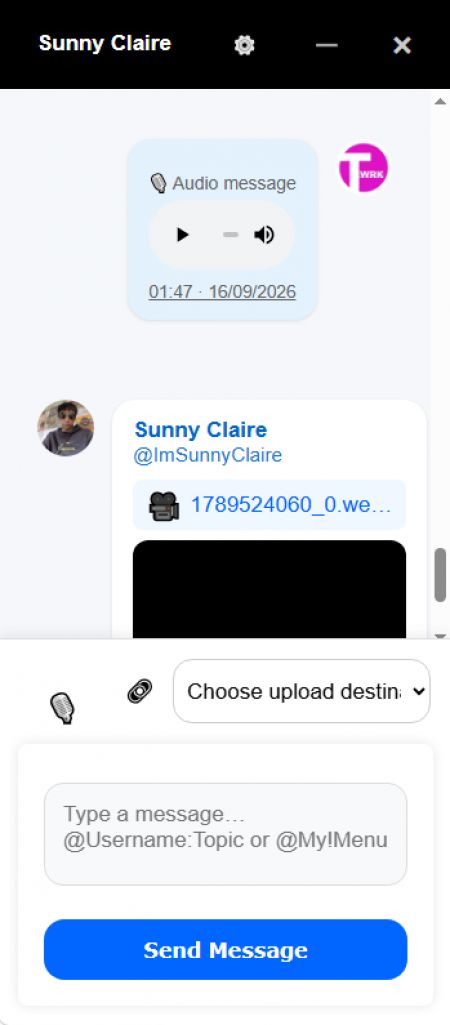
Messaging Composer


The existing messaging composer gains a microphone control positioned alongside the existing attachment controls.

Conceptually:

🎙️ 🔗 Message... Send

Users can record an Audio Chat directly from the messaging interface.

Recording


Browser recording uses the available media recording capabilities of the user's device/browser.

Once recording begins, the user can stop the recording and preview the pending audio before sending it.

Audio Without Text


An important part of the implementation is that an Audio Chat does not require a text message.

A message can therefore consist entirely of:

🎙️ Audio Recording

rather than requiring:

Text + Audio Recording

This allows audio to behave as a genuine messaging format rather than merely as an attachment to text.

Direct Conversations


Audio can be recorded and sent inside ordinary one-to-one TXTWRK conversations.

Group Conversations


The same capability is available within group messaging.

The messaging architecture therefore becomes:

Messaging
│
├── Direct Chat
│ └── Audio Chat
│
└── Group Chat
└── Audio Chat

---

6. Messaging Audio Storage


Messaging Audio Chats also introduce selectable storage.

The default storage destination is TXTWRK Data Balance.

A user with an appropriate Messaging API/server connection can instead choose to store Audio Chats on their connected server.

Default


Audio Storage:
TXTWRK Data Balance

This requires no additional server configuration.

Connected Server


Where suitable infrastructure has been configured:

Audio Storage:
My Messaging API Server

can be selected instead.

Conceptually:

Audio Chat
│
▼
TXTWRK
│
├────────► TXTWRK Data Balance
│
└────────► Messaging API / User Server

This allows users who operate their own infrastructure to preserve their TXTWRK data allowance by storing the underlying recording themselves.

---

7. TXTWRK Messaging Audio Storage Structure


TXTWRK-hosted Messaging Audio has been deliberately separated from the earlier Audio Room systems.

Its storage hierarchy is:

/1-audio-rooms-messaging/
{memberID}/
direct/
{chat_controller_id}/
audio_xxxxx.webm

group/
{group_id}/
audio_xxxxx.webm

This keeps:
•Post Audio Rooms
•Checklist Audio Rooms
•Messaging Audio Chats

separate at the storage level.

The implementations therefore do not need to interfere with one another simply because they all contain recorded audio.

---

8. Messaging Audio Data Accounting


When an Audio Chat is stored by TXTWRK, it consumes the appropriate user's TXTWRK data balance.

The recording therefore becomes part of the same broader storage economy as other TXTWRK-hosted data.

Where the user's own Messaging API server is selected instead, TXTWRK does not need to charge its own storage balance for the underlying audio object.

This creates a practical reason for users with their own infrastructure to connect it.

---

9. Audio Deletion and Ownership


Messaging storage also requires different deletion behaviour depending on where the media lives.

TXTWRK-Hosted Audio


Where TXTWRK owns the physical stored object, the system can manage:
•physical deletion;
•storage metadata;
•data accounting; and
•appropriate data refunds.

User-Server Audio


Where the audio resides on a user's connected server, TXTWRK should not treat that physical object as its own property.

Removing or hiding the TXTWRK message therefore does not mean TXTWRK should reach into the user's server and destroy the original media object.

Conceptually:

TXTWRK-hosted recording
↓
TXTWRK controls storage lifecycle

User-server recording
↓
Server owner controls storage lifecycle

This establishes a clearer ownership boundary between TXTWRK and connected infrastructure.

---

10. Protecting Private Messaging Audio


The TXTWRK Messaging Audio storage directory has also been treated separately from the earlier public Audio Room work.

The directory:

/1-audio-rooms-messaging/

can have its own .htaccess protection.

The protection includes:
•directory indexing disabled;
•executable scripts blocked;
•unexpected file types blocked;
•MIME sniffing protection;
•direct/no-referrer requests rejected; and
•playback requests restricted to TXTWRK-originating pages under the current hotlink-protection model.

This protection applies only to Messaging Audio.

The earlier Post and Checklist Audio Room directories are not changed by this Messaging-specific protection.

---

11. End-of-Day Audio Architecture


At the end of today's work, TXTWRK effectively has three different audio systems serving three different purposes.

AreaAudio TypePrimary PurposeParticipationStorage
PostsAudio RoomsSocial discussionHost + requested/accepted guestsTXTWRK
ChecklistsAudio RoomsWork collaborationChecklist-authorized usersTXTWRK or connected server
MessagingAudio ChatsPrivate communicationDirect/group participantsTXTWRK or Messaging API server
This separation is important.

The goal has not been to create three copies of the same microphone feature.

Each implementation reflects its environment.

---

12. Social Audio


Post Audio Rooms represent the social layer.

SOCIAL
│
▼
Post
│
▼
Audio Room
│
├── Host
├── Live / Offline
├── Join Requests
├── Accept / Block
├── Recording Limits
└── Playback

The conversation revolves around published content.

---

13. Work Audio


Checklist Audio Rooms represent the work layer.

WORK
│
▼
Checklist
│
▼
Checklist Item
│
▼
Audio Room
│
├── Checklist Permissions
├── Recording
├── Topics
├── Date Organisation
├── Public Listening
└── Selectable Storage

The conversation revolves around a specific piece of work.

---

14. Private Audio


Messaging Audio Chats represent the private communication layer.

PRIVATE
│
▼
Messaging
│
├── Direct
│ └── Audio Chat
│
└── Group
└── Audio Chat

The conversation revolves around private communication between users or groups.

---

15. One Audio Layer Across TXTWRK


Together, the three implementations can be viewed as:

TXTWRK AUDIO
│
┌───────────────┼───────────────┐
│ │ │
▼ ▼ ▼
SOCIAL WORK PRIVATE
│ │ │
POST CHECKLIST MESSAGING
│ │ │
AUDIO ROOM AUDIO ROOM AUDIO CHAT
│ │ │
Discussion Collaboration Conversation

This is a much broader development than simply adding voice messages.

Audio now has a place across three fundamentally different types of activity on TXTWRK.

---

16. Competitive Comparison — TXTWRK Audio Across the Network


Recorded audio itself is not unusual among modern communication networks.

Major messaging and collaboration platforms already provide various forms of:
•voice messages;
•recorded clips;
•voice channels;
•calls;
•meetings; and
•synchronous audio.

The more relevant comparison is therefore not:

"Does TXTWRK have audio?"

The more useful question is:

"Where can audio exist within TXTWRK, what is it attached to, who controls participation, and who controls its storage?"

That produces a considerably more interesting comparison.

---

17. Comparison With Other Major Networks


CapabilityTXTWRKWhatsAppDiscordSignalSlackMicrosoft Teams
Recorded audio in direct messagingYesYesYesYesYesYes
Recorded audio in group messagingYesYesYesYesYesYes
Audio connected directly to social postsYesNo direct equivalentDifferent modelNoDifferent modelDifferent model
Dedicated Audio Room attached to a postYesNoVoice channels use a different modelNoHuddles use a different modelMeetings use a different model
Audio attached directly to checklist/work itemsYesNoNo direct equivalentNoNo direct equivalentNo direct equivalent
Existing checklist permissions control recording accessYes—————
Public listening with controlled recording participationYes—Different model—Different modelDifferent model
Choice between platform storage and user's own serverYesNo normal user-facing equivalentNo normal user-facing equivalentNo normal user-facing equivalentNo normal user-facing equivalentNo normal user-facing equivalent
Own-server audio can avoid platform data usageYes—————
Audio integrated across social + work + private messagingYesPrimarily messagingCommunity + messagingPrimarily messagingWork + messagingWork + messaging
The comparison is not intended to suggest that other platforms lack sophisticated audio systems.

Several of them have extremely mature audio, calling, transcription, encryption and mobile experiences.

The distinction is the combination TXTWRK is developing.

---

18. Comparison With Messaging Networks


Platforms such as WhatsApp and Signal demonstrate the established value of asynchronous voice communication.

Voice recordings work naturally when users want to communicate something faster or more personally than typing a message.

TXTWRK Messaging now enters that same general category through Audio Chats.

However, TXTWRK's implementation also connects messaging audio to its wider infrastructure model.

A user can potentially choose between:

TXTWRK-hosted media

or:

User-hosted media

while continuing to use the same TXTWRK conversation.

The communication network and storage provider therefore do not necessarily have to be the same entity.

---

19. Comparison With Community Platforms


Discord demonstrates another model where audio extends beyond conventional private messaging.

Its ecosystem combines messaging with community-oriented voice functionality.

TXTWRK Post Audio Rooms approach community audio differently.

Instead of creating a voice channel that exists independently of a piece of content, the Audio Room belongs directly to a post.

Conceptually:

Traditional Community Voice

Community
↓
Voice Channel
↓
Conversation


TXTWRK Post Audio

Post
↓
Audio Room
↓
Conversation about that Post

The content itself becomes the location of the audio discussion.

---

20. Comparison With Workplace Platforms


Slack and Microsoft Teams demonstrate how recorded communication can become useful in professional collaboration.

Audio and video clips can reduce the need for synchronous meetings and allow information to be consumed asynchronously.

TXTWRK Checklist Audio Rooms approach the work context from the perspective of the work item itself.

Instead of:

Channel
↓
Discussion
↓
User determines which task it concerns

TXTWRK can provide:

Checklist Item
↓
Audio Discussion
↓
Context already established

The recording is already attached to the object being discussed.

This reduces the separation between communication and the work itself.

---

21. Storage as an Architectural Difference


One of the most significant differences introduced during today's development is the ability to separate TXTWRK's application layer from the physical storage layer.

A conventional hosted network can broadly be represented as:

User
│
▼
Platform
│
▼
Platform-Controlled Storage

TXTWRK is developing another possibility:

User
│
▼
TXTWRK
│
├────────────► TXTWRK Storage
│
└────────────► User-Controlled Server

TXTWRK can remain responsible for:
•identity;
•permissions;
•conversations;
•checklist relationships;
•room metadata;
•interfaces; and
•application logic

while the physical media can, where supported, live somewhere selected by the user.

---

22. Data Balance or Infrastructure Ownership


This creates two different ways of consuming an audio service.

TXTWRK Data Balance


The simplest route is:

Record
↓
TXTWRK
↓
TXTWRK Storage
↓
Data Balance

No external infrastructure is required.

User Infrastructure


A user with their own compatible server can instead use:

Record
↓
TXTWRK
↓
Connected Server
↓
User-Controlled Storage

This can reduce consumption of the user's TXTWRK data balance while giving the server owner greater control over the underlying media object.

---

23. The Network and the Storage Do Not Have to Be the Same Thing


This is an important architectural principle emerging from the work.

Historically, users of a hosted social or messaging network generally expect:

Platform = Application + Communication + Storage

TXTWRK can increasingly operate as:

TXTWRK = Application + Communication + Coordination

while:

Storage = TXTWRK OR User Infrastructure

That distinction is now visible in both:
•Checklist Audio Rooms
•Messaging Audio Chats

and can potentially become relevant to additional TXTWRK services in the future.

---

24. Different Permission Models for Different Contexts


Another important outcome is that TXTWRK has not attempted to impose one permission model everywhere.

Post


A public/social Audio Room requires explicit moderation.

Visitor
↓
Join
↓
Host Accepts
↓
Record

Checklist


A collaborative work environment already knows who should have access.

Checklist User
↓
Existing Permission
↓
Record

Messaging


A private conversation already establishes participation.

Conversation Member
↓
Direct / Group Access
↓
Record and Send

These are three different solutions because they solve three different problems.

---

25. Why This Is More Than a Microphone Button


From the user's perspective, all three systems may contain a microphone.

Technically and architecturally, however, today's work encompasses much more.

It includes:
•room ownership;
•Live/Offline state;
•participation requests;
•acceptance;
•blocking;
•recording limits;
•checklist permissions;
•public listening;
•recording topics;
•filtering;
•date organisation;
•direct messaging;
•group messaging;
•audio-only messages;
•inline playback;
•TXTWRK storage;
•connected-server storage;
•data accounting;
•storage ownership;
•deletion behaviour; and
•protected private media directories.

The microphone is therefore only the visible entry point into a much larger system.

---

26. TXTWRK's Emerging Audio Model


The architecture can now be summarised as:

┌─────────────────────────────────────────────┐
│ TXTWRK AUDIO │
└─────────────────────────────────────────────┘
│
┌───────────────┼───────────────┐
│ │ │
▼ ▼ ▼
SOCIAL WORK PRIVATE
│ │ │
▼ ▼ ▼
POSTS CHECKLISTS MESSAGING
│ │ │
▼ ▼ ▼
AUDIO ROOMS AUDIO ROOMS AUDIO CHATS
│ │ │
├───────┬───────┴───────┬───────┤
│ │ │ │
▼ ▼ ▼ ▼
RECORD PLAYBACK TXTWRK OWN SERVER
STORAGE STORAGE

This creates a foundation that can be extended rather than requiring an entirely new audio architecture every time another part of TXTWRK needs recorded communication.

---

27. Areas Where Established Platforms Remain More Mature


A competitive comparison should also recognise where long-established communication platforms have mature capabilities that TXTWRK can continue developing.

Depending on the platform, these include areas such as:
•native mobile recording experiences;
•end-to-end encrypted media delivery;
•transcription;
•captions;
•accessibility;
•noise processing;
•waveform interfaces;
•playback-speed controls;
•large-scale media delivery;
•synchronous calling;
•large voice channels;
•sophisticated notification systems; and
•extensive moderation infrastructure.

The significance of today's TXTWRK development is therefore not a claim that every individual audio capability exceeds those of established networks.

The significance is the combination and integration being developed.

---

28. TXTWRK's Combination


TXTWRK can increasingly be described as combining:

SOCIAL PUBLISHING

That combination is considerably more meaningful than treating Audio Rooms and Audio Chats as isolated features.

---

29. Today's Progress


At the beginning of this development path, Audio Rooms were associated primarily with posts.

The architecture now covers:

POSTS
│
▼
AUDIO ROOMS


CHECKLISTS
│
▼
AUDIO ROOMS


MESSAGING
│
▼
AUDIO CHATS

Each serves a different type of communication.

Posts provide social discussion.

Checklists provide work-related collaboration.

Messaging provides private conversation.

---

30. End-of-Day Position — 16 September 2026


By the end of today's work, recorded audio has moved from being a feature within one area of TXTWRK toward becoming a capability of the wider network.

The architecture now supports the idea that audio can belong to:
•published content;
•a collaborative task;
•a direct conversation; or
•a group conversation.

At the same time, the infrastructure work introduces the principle that the media itself can potentially belong either to:
•TXTWRK storage; or
•infrastructure controlled by the user.

That gives TXTWRK an increasingly clear separation between communication, context and storage.

The day's work can therefore be summarised simply:

> Posts gained conversation through Audio Rooms.
>
> Checklists gained contextual collaboration through Audio Rooms.
>
> Messaging gained private recorded communication through Audio Chats.
>
> And TXTWRK's audio architecture began moving beyond platform-only storage toward user-selectable infrastructure.

Not a bad day's work.

1/3
🗖 VIEW