
































X

TXTWRK


PERSONAL
LinkingLinking
FollowingFollowing
ConnectionsConnections
MessagesMessages
NotificationsNotifications
DISCOVER
SearchSearch
ReelsReels
CalendarCalendar
MapMaps
Work
NotesNotes
NeedsNeeds
ContributionsContributions
TimetableTimetable
IntelIntel
To DosTo Dos
ChecklistsChecklists
SavesSaves
ScrapboardScrapboard
LinksLinks
Monetisation
CoinsCoins
AdvertisingAdvertising
SubscriptionSubscription
DonationDonation
Log BookLog Book
Organisation
BusinessBusiness
AddressesAddresses
InvestorInvestor
FinancialsFinancials
Quarterly'sQuarterly's
SharesShares
Server
ServerServer
WorkspaceWorkspace
Code PlaygroundPlayground
Learn More
AboutAbout
AIDAID
DataData
DevDev
Web ImpressionsImpressions
ToolsTools
EducationEducation
SafetySafety
ReaderReader
My Content
Profile Image
Login

My Addresses

×
Addresses
+
Character Profiles
+
Info & Cover
+
Timetables
+
Favorited by... X
Link Clicks X
All comments... X
More | 1/33

TXTWRK Verified Website

@TXTWRK

City of Derby, Derby, Derbyshire, East Midlands, England, United Kingdom, Europe

Our mission is to help people make text work in daily life. Get investment, volunteers, donations & more publicly…

Join the journey & make a profile to remember... Discover our investment opportunities via our card: @TXTWRK

We developed & support the @UnitedKingdom movement through #UnitedKingdom


Brand
12/01/2024
Learn more about me 𓇻
Donations: £2.50
▦ Photos
▦ Videos
▦ Covers
Applications
Questionnaires
Active: 2 hours ago
Safety


OPENING TIMES
Show Images
Select a Store Location...
▼

Initializing schedule...

LOCAL PULSE

Profile Signals

Loading…
Loading profile signal…

Loading latest public Local Pulse signal…

Financials Financials
Quarterlys Quarterlys
Shares Shares
Notes Notes
Needs Needs
Contributions Contributions
Timetable Timetable
Intel Intel
To Dos To Dos
Notes Reel


Happening & Service
Happening Now and service updates connected to this profile


Happening in Offers
Offers available from this profile
Loading offers…


Connections
These are pages I added


Intel Pinned

Transparency of Operations
To make things even clearer, we are going to be updating our business registration in the coming days to 'TXTWRK Limited' in the UK & currently operate online in our startup phase, with workshops in educational institutions & community settings. We operate via the following domains: We monitise via the following sites: We operate the following social media: We operate the email addresses:
•Team@TXTWRK.com
•Support@TXTWRK.com
•Business@TXTWRK.com
•CommunityLibrary@TXTWRK.com
•Sponsors@TXTWRK.com
•Volunteer@TXTWRK.com
•Work@TXTWRK.com
•Writers@TXTRK.com
We operate the following TXTWRK pages: We operate the phone numbers: •447984582170 •0800 line coming soon We operate the following addresses:
•Currently in the process of setting up our office
•PO BOX coming soon & we focus on written communications
More intel:
•Need to request a removal from our Community Library, then simply email CommunityLibrary@TXTWRK.com
•Looking for account control, refer to ⚙ Settings/Linking to update your details or view https://txtwrk.com/account to understand your data or delete account
•We will never ask for your password or sensitive information and you should follow forms such as https://txtwrk.com/reset if you need to regain access to your account.
•We operate PayPal via our websites & also on TXTWRK
We keep this information up to date and concurrently here at TXTWRK via our intel reels - Last updated: 13/04/2026 00:16
Pinned Intel · 2026-04-12 23:14:46


Loading media...
DOUBLE TAP TO OPEN
+AI
+Analysis
•TXTWRK
+Assets
+Media
•Logos
+Standards
•Font
+Audio
•From Our Community
+Podcasts
+AI
•Insider Preview
+Language
•S1 E1 Psychology Research by @ImSunnyClaire
+Challenges
•Web Development
+Checklists
+Dev
•Business
•Server
•Web
•For Community
+Community Mentions
•Recognised as Stories
+Datasets
+Measurements
•Daily Common
+Documentation
•3D, AR & VR
+AI
•Checklists with AI
•Future Capabilities
•Insights
•Make Artistic Web Impressions
+Models
•Apple Intelligence
•Bing Copilot
•ChatGPT
•Claude
•IBM WatsonX
•Perchance
•Qwen
•TXTWRK AID
•Teaching
+Accessibility
•Feature Displayer
+Account Management
•Switch Accounts
•All Activity
+Assets
•Feedback
•Learn how to use assets
+Posting
•Set Projection
+Business
•Opportunities
+Checklists
•All Activity
•Applying
•Checklists Command Input 1.0
•Create
•Create Checklist with AI
•Directory API
•Engage
•Public Working
•Replicate
+Templates
•Starter Set
•Connect
+Data
•Account
•Cross Network Data API
•Directory
•Donations
+Feedback
•Streets
•TXTWRK Pulse
•Following
+Games
•Quiz
•Happening
+History
•In 1000 years
+Investors
+Crowdfunding
•Kickstarter
+Funding Rounds
•Funding Round 1
•Funding Round 2
•Funding Round 3
+Summary of Funding Rounds
•3 Core Funding Rounds
•Tools
+Labels
•Introduction
+Live
•Audio Rooms
+Location
•Addresses
+Management
•Future Proof
+Media
•3D Elements
•Record Audio
+Web Impressions
•Stickers
•Themes & Slideshows
•Messaging
•Monitisation
•Notifications
+Posting
•Prize Draws
•Transparency
+Progress
•Friday Weekly Updates
•In 1000 years
•TXTWRK Team
•Questions
•Reels
•Registration
+Safeguarding
•Covers of Education
•Logical Filters
•Our Safety Tools
•Search
+Selling
•Log Book & Types
+Server
•Connect to TXTWRK
•TXTWRK Servers
•Workspace
•Set Projection
+Shortcuts
•Posts
•Story Mode
+The Framework
•Language
•Tools
•Trending Topics
+Events
+April
•Easter
+December
•Christmas
•Hanukah
+March
•Eid Mubarak
•Seasons
+TXTWRK
•Annual
+Films
+From TXTWRK to Film
•Our Trail To Work
+Person of Interest X 2025
•Preview
+The Super 10
•Preview
+Learn How To
•Social Media
+Our Feedback
+Companies
+Alphabet Inc
•YouTube
•Facebook
+Partners
+AI
•Microsoft
+Educational
•Derby College
+People
+Digital
•Steve Jobs
+Role Models
•Questions
+Shop
+Digital
•NFT The Platinum Collection
+Subscriptions
+From TXTWRK
•Monthly Tiers
+United Kingdom
+Guidance
•Startups
+Podcasts
•S1 E1 The Start
+Work
+Startup
•Kids
+World
•Pledges
•Politics


@TXTWRK


⛶
Technology
Neutral
📢 TXTWRK Update: Introducing the Post Draft Upgrade with Library 💾


Create now. Save locally. Publish when you're ready.

At @TXTWRK, we're continuing to improve how people create, manage and publish content.

Our new Post Draft Library gives members greater control over unfinished posts, including posts containing text, images, videos, audio, checklists and other interactive content.

Instead of requiring every unfinished post to be uploaded to our servers, TXTWRK now supports browser-based draft storage.

You decide when to save, what to keep and when to publish.

---

💾 1. How the New Draft Library Works


TXTWRK uses your browser's IndexedDB storage system to save unfinished post payloads on your device.

A post payload is the collection of information you have entered or attached to a post before publication.

This can include your written content, selected options, attachments and other post settings.

FeatureWhat it does
💾 Save DraftManually save the post you're creating
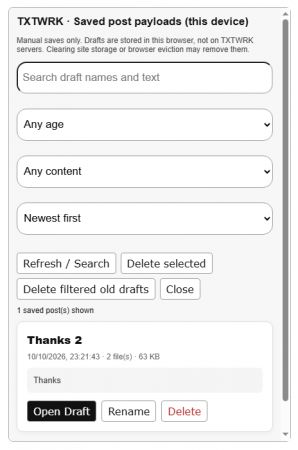
📄 Manage DraftsBrowse previously saved post payloads
✏️ Update DraftMake changes and save over an existing draft
📑 Save New CopyKeep another version of your post
📂 Open DraftReturn saved content to the post composer
🔎 Search & FilterFind drafts by name, age or media content
🏷️ RenameGive saved drafts meaningful names
🗑️ DeleteRemove individual or multiple saved drafts
↺ Reset PostClear your current post without deleting saved drafts
There is no automatic draft saving.

When you press Save Draft, TXTWRK saves your current work locally. Changes made after that save must be saved again if you want to preserve them.

Your saved drafts remain available for later use, provided your browser retains its site storage.

---

🎬 2. More Than Just Saving Text


TXTWRK posts can contain considerably more than a message and a photograph.

Our draft system is designed to preserve the information entered across the post composer.

Supported content and settings


Post featureDraft support
📝 Text, topics and assetsSaved form content
📸 PhotosSelected files and preview restoration
🎥 VideosSelected video files and related fields
🎙️ Voice and MP3Audio files and form settings
🎚️ Audio StudioProject arrangements and recorded takes
📖 StoriesScenes, media and narration fields
ChecklistsItems, groups and selected settings
🖥️ Checklist ServersSelected server information
🛍️ ProductsProduct form values
📈 InvestmentsFunding details and settings
EventsEvent details and dates
❓ QuestionnairesSaved input values
📍 LocationsLocation IDs and form selections
🔒 PrivacyAudience and visibility choices
💰 Paid ContentPricing and subscription settings
📊 CSV and 3DSupported files and related form values
🌐 Web ImpressionsSaved fields and HTML content
Important: Basic form values are broadly supported. Some advanced interactive editors may require additional review or adjustment after reopening a draft. Not every generated preview or editor state is guaranteed to be restored perfectly.

Our aim is to make returning to complex unfinished posts much easier.

---

👥 3. What Happens When Multiple Members Use the Same Device?


TXTWRK links each local draft library to the signed-in member's unique memberID.

For example, imagine two TXTWRK members using the same computer and browser profile.

ActionMember AMember B
Signs into TXTWRKMember A active—
Saves three drafts3 local drafts—
Signs outDrafts remain stored—
Member B signs inA's drafts not listedB's library opens
Member B saves two drafts3 drafts remain2 local drafts
Member A signs back inOriginal 3 drafts appearB's drafts remain separate
### What does that mean?
•Each member gets their own draft list within the TXTWRK interface.
•Signing out does not automatically erase saved drafts.
•Returning to the same account, browser and device allows that member to reopen their drafts.
•Another member signing in is not shown the previous member's draft library.

A privacy reminder: Member-specific draft lists provide application-level separation, not encryption or complete protection from someone who has access to the device's browser storage. Avoid storing sensitive drafts on shared or public computers.

---

📱 4. What Happens If You Change Devices?


Because TXTWRK's new draft system is browser-based, the location of your drafts matters.

SituationWill your saved drafts be available?
Close and reopen the same browserUsually yes
Restart your phone or computerUsually yes
Return after switching between appsUsually yes
Sign out and back into the same accountYes, if local storage remains
Another member signs in on the same browserOnly their own drafts are listed
Use a different browserNo automatic transfer
Sign in on another phoneNo automatic transfer
Clear TXTWRK browser site storageDrafts may be permanently lost
Uninstall a browser or clear its app dataDrafts may be lost
Your TXTWRK account identifies which local draft library to display, but the files themselves are not synchronised between your devices.

Save Draft is not a cloud-backup service. Browser storage may be cleared or evicted, and large media files are subject to available storage capacity.

---

🌍 5. How Does TXTWRK Compare with Other Social Networks?


Different networks take different approaches to unfinished content.

PlatformDraft approachKey distinction
TXTWRKManual, browser-based Draft LibraryMultiple named post payloads with supported files and settings
InstagramDrafts for posts and ReelsPrimarily device-based editing and content drafts
TikTokVideo draft collectionDrafts are device-dependent and may be lost after app removal
XPost and thread draftsDraft behaviour varies by application and device
LinkedInPost and article draftsSome drafts can be continued across devices
FacebookPersonal and Page draft workflowsDraft management differs between personal posting and Pages
TXTWRK's focus is on preserving more of the post creation process, rather than treating a draft as written text alone.

We also recognise that other platforms offer features such as cross-device drafts that TXTWRK's local-only library does not currently provide.

This is a different approach, designed around user-controlled local saving and the wide range of content TXTWRK supports.

---

💽 6. Why Use Browser Storage Instead of Uploading Every Draft?


There are several benefits to keeping unfinished post payloads locally.

For members

•More control: Decide exactly when to save.
•Less unnecessary uploading: Saving a draft does not submit the post payload to TXTWRK's draft servers.
•Multiple projects: Keep several unfinished posts and return to them individually.
•Media recovery: Selected files can be stored locally when browser storage permits.
•Draft management: Organise older work without publishing or deleting everything.

For the platform

•Fewer unnecessary draft-storage requests.
•Less server storage consumed by unfinished post uploads.
•Reduced dependence on repeated server-side draft saving.
•Separation between preparing content and publishing content.

The distinction matters: saving locally prepares your work for later, while pressing Post sends your finished content through TXTWRK's normal publishing process.

---

🚀 7. How to Save and Reopen a Post


Using the Draft Library is straightforward.

1. Start creating a post. Add your text, media and other content.
2. Press 💾 Save Draft. Give your draft a name.
3. Continue working or leave TXTWRK. Your saved version remains in browser storage.
4. Return to TXTWRK. Sign into the same account using the same browser profile.
5. Press 📄 Manage Drafts. Browse or search your saved posts.
6. Select Open. TXTWRK loads the saved payload back into the composer.
7. Review and publish. Check restored media and settings, make any final changes, then press Post.

You can also use Save New Copy to preserve an earlier version while continuing to develop another.

What about old drafts?


The manager supports searching, sorting, filtering by age or media, and deleting individual or multiple saved records.

Saved drafts are not automatically removed simply because you reset the composer or publish a post. You can manage or delete those saved copies yourself.

---

⚠️ 8. Important Things to Remember


We want members to understand both the capabilities and limitations of this feature.

1. Browser storage is not unlimited. Large videos and other attachments may reach browser storage limits.

2. Save important work regularly. TXTWRK does not automatically save changes between manual saves.

3. Do not clear your site storage if you need your drafts. Clearing browser data can permanently remove locally saved content.

4. Use the same browser profile. Signing into TXTWRK on another browser or device will not automatically retrieve these drafts.

5. Review complex posts before publishing. Advanced media editors and interactive components may need adjustment after reopening.

6. Wait for a successful save confirmation. If saving fails because storage is full or unavailable, your latest changes have not been safely preserved.

---

🌱 9. What's Next for TXTWRK?


The Draft Library is another step towards making TXTWRK a more flexible environment for creating content.

We're building beyond the idea that a social post must be completed and published in one session.

Our longer-term goal is a creative environment where members can prepare detailed posts, work with different media formats, return to unfinished projects and manage their content before it goes public.

That means continuing to improve advanced editor restoration, media handling and the reliability of local draft recovery.

---

💬 Your Work. Your Timing. Your TXTWRK.


Not every idea needs to be published immediately.

Sometimes you want to write today, add media tomorrow, review your settings later and publish when everything is ready.

TXTWRK's Post Draft Library gives you that flexibility — with manual saving, local storage and multiple draft management tools.

Sign into TXTWRK, open your post composer and explore 💾 Save Draft and 📄 Manage Drafts.

What other draft-management features would you like us to introduce?

@TXTWRK — Helping the world make text work in daily life.

#TXTWRK #TXTWRKUpdate #SocialMedia #Drafts #ContentCreation #DigitalCreativity #CreatorTools #BrowserStorage #WebDevelopment

🗖 VIEW
⛶
How-To / Tutorial
Neutral
You don’t need a website to start. You need momentum—and memory.


TXTWRK isn’t just about starting faster.
It’s about never losing your history.

Traditional websites overwrite themselves.

When a web page changes, it changes forever:
•old context disappears
•early intent is erased
•progress gets flattened into a “current version”
•the journey is lost

TXTWRK works differently.

---

Progress stacks. Nothing gets erased.


On TXTWRK:
•old information stays accessible
•new information naturally surfaces higher
•ideas evolve without being overwritten
•history becomes proof, not clutter

Your startup isn’t a single page—it’s a timeline of intent, action, and growth.

People can:
•scroll back to see where you started
•understand why decisions were made
•track momentum instead of guessing legitimacy

That’s credibility you can’t fake with a landing page.

---

Structured now. Expand forever.


Using the menu / topic organization system, you:
•start with simple signals (what you’re building, what you need)
•expand ideas through the post box
•let new updates rise without destroying the past
•keep everything navigable, contextual, and alive

Instead of rewriting pages, you add layers.

Classic publishing logic:

> new information surfaces
> old information remains reachable

This mirrors how people actually think, research, and trust.

---

Start now. Build the website later—without losing your story.


TXTWRK is your operating layer before you need a presentation layer.

You can:
•seek volunteers
•attract investment
•accept donations
•coordinate work
•document progress publicly

All while preserving your full evolution.

Later, when you build your website:
•plug in TXTWRK plugins
•connect your server to TXTWRK checklists & messaging
•sync updates instead of rewriting content
•keep your site polished while TXTWRK keeps your history intact

Your website becomes a snapshot.
TXTWRK remains the source of truth.

---

Built for founders without a site—and founders who already have one


TXTWRK supports:
•people with no website yet
•people with established sites who want depth, coordination, and continuity

Major advantages:
•no information loss
•no duplicated effort
•structured visibility
•local discovery through linking
•real-time collaboration layered on top of real history

Static pages explain.
TXTWRK proves.

---

We’re changing how startups start—and how they’re remembered


Startups don’t fail because they didn’t look polished early.
They fail because momentum disappears or trust never forms.

TXTWRK preserves:
•intent
•effort
•evolution

You don’t overwrite your past.
You build on it.

Start now.
Build the website later.
Let your progress speak—permanently.

🗖 VIEW


⛶
Politics
Neutral
We've opened up the Political / News type content selector at TXTWRK via the post box.

This helps politicians and people writing about politics define their posts better, right up to news agencies defining their stories as news.

It's all about public transparency and we look forward to building this layer of transparency on posts in the coming days, giving you the ability to have have covers enabled, post provided with additional label or even choose not to see these types of posts at all. You'll get to define your preferences as a user soon in a new way!

Do you support our pledge for all networks to enable this mode at post creation?

Sign Pledge
⛶
Neutral
Test run on post draw

Now you'll be able to run a post draw based on people who've loved your post, where they'll get a notification to say if they've won!

⛶
Neutral
What do you do when you go on someone’s profile?

📜 Posts overload
🎞️ Media overload

That’s the reality of conventional social media today. You’re going to get an experience that is overloaded, difficult to filter and not the content you’re looking for.

To date, we managed to implement topics & an asset menu features to help you become more organised. Over the coming weeks, we will also be introducing filters to profiles, so you can search users posts and select a date range — tools that all major networks should of deployed a long time ago! (Big tech can play catchup, but because we have other unique organisation tools, we are in an advantageous position, even this early in our developments, that’s why you should begin your journey with us today at TXTWRK)