TXTWRK

Home

PERSONAL
LinkingLinking
FollowingFollowing
ConnectionsConnections
MessagesMessages
NotificationsNotifications
Work
PostingPost
NotesNotes
NeedsNeeds
ContributionsContributions
TimetableTimetable
IntelIntel
To DosTo Dos
ChecklistsChecklists
SavesSaves
ScrapboardScrapboard
LinksLinks
DISCOVER
SearchSearch
ReelsReels
All ActivityAll Activity
CalendarCalendar
MapMaps
Getting StartedLaunch
HappeningHappening
Local PulseLocal Pulse
Products NearbyNearby
Trending TopicsTrending
TXTWRK PremiumPremium
Monetisation
CoinsCoins
AdvertisingAdvertising
SubscriptionSubscription
DonationDonation
Log BookLog Book
Organisation
BusinessBusiness
AddressesAddresses
InvestorInvestor
FinancialsFinancials
Quarterly'sQuarterly's
SharesShares
Server
ServerServer
WorkspaceWorkspace
Code PlaygroundPlayground
Learn More
AboutAbout
AIDAID
DataData
DevDev
Web ImpressionsImpressions
ToolsTools
EducationEducation
SafetySafety
ReaderReader
My Content
Login
Profile Image
Post submitted
Favorited by... X
Link Clicks X
All comments... X
TXTWRK.com | Home 🗓
TXTWRK WEATHER
A moment of clarity.
Weather powered by Open-Meteo
0
3
6
9
12
15
18
21
24

Loading local weather…
Today:
Web Impression

📝 Post

📰 Feed

📍 Local Pulse

🌍 Happening Now

🗺️ Maps

🎬 Reels

📈 Trending Topics

🚀 Getting Started

🚶 Stickman: Daily Activities

🛡️ Safety

🌍 Global Feed
🌎 Home People
🌏 Existing People
✨ Just For You
📯 Mentions
👨‍👩‍👦 Following
👨 Followers
🖼 Photo
📽 Video
🎼 Audio
🎶 MP3
🌐 Web Impressions
🧊 3D Content
✅ Checklists
📈 Investments
📅 Upcoming
🛍 Shop
🔗 Links
Filter Category
Sort Order
⛶
Technology
Neutral
📢 TXTWRK Update: Introducing the Post Draft Upgrade with Library 💾


Create now. Save locally. Publish when you're ready.

At @TXTWRK, we're continuing to improve how people create, manage and publish content.

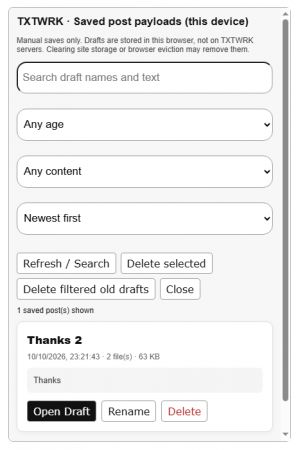
Our new Post Draft Library gives members greater control over unfinished posts, including posts containing text, images, videos, audio, checklists and other interactive content.

Instead of requiring every unfinished post to be uploaded to our servers, TXTWRK now supports browser-based draft storage.

You decide when to save, what to keep and when to publish.

---

💾 1. How the New Draft Library Works


TXTWRK uses your browser's IndexedDB storage system to save unfinished post payloads on your device.

A post payload is the collection of information you have entered or attached to a post before publication.

This can include your written content, selected options, attachments and other post settings.

FeatureWhat it does
💾 Save DraftManually save the post you're creating
📄 Manage DraftsBrowse previously saved post payloads
✏️ Update DraftMake changes and save over an existing draft
📑 Save New CopyKeep another version of your post
📂 Open DraftReturn saved content to the post composer
🔎 Search & FilterFind drafts by name, age or media content
🏷️ RenameGive saved drafts meaningful names
🗑️ DeleteRemove individual or multiple saved drafts
↺ Reset PostClear your current post without deleting saved drafts
There is no automatic draft saving.

When you press Save Draft, TXTWRK saves your current work locally. Changes made after that save must be saved again if you want to preserve them.

Your saved drafts remain available for later use, provided your browser retains its site storage.

---

🎬 2. More Than Just Saving Text


TXTWRK posts can contain considerably more than a message and a photograph.

Our draft system is designed to preserve the information entered across the post composer.

Supported content and settings


Post featureDraft support
📝 Text, topics and assetsSaved form content
📸 PhotosSelected files and preview restoration
🎥 VideosSelected video files and related fields
🎙️ Voice and MP3Audio files and form settings
🎚️ Audio StudioProject arrangements and recorded takes
📖 StoriesScenes, media and narration fields
ChecklistsItems, groups and selected settings
🖥️ Checklist ServersSelected server information
🛍️ ProductsProduct form values
📈 InvestmentsFunding details and settings
EventsEvent details and dates
❓ QuestionnairesSaved input values
📍 LocationsLocation IDs and form selections
🔒 PrivacyAudience and visibility choices
💰 Paid ContentPricing and subscription settings
📊 CSV and 3DSupported files and related form values
🌐 Web ImpressionsSaved fields and HTML content
Important: Basic form values are broadly supported. Some advanced interactive editors may require additional review or adjustment after reopening a draft. Not every generated preview or editor state is guaranteed to be restored perfectly.

Our aim is to make returning to complex unfinished posts much easier.

---

👥 3. What Happens When Multiple Members Use the Same Device?


TXTWRK links each local draft library to the signed-in member's unique memberID.

For example, imagine two TXTWRK members using the same computer and browser profile.

ActionMember AMember B
Signs into TXTWRKMember A active—
Saves three drafts3 local drafts—
Signs outDrafts remain stored—
Member B signs inA's drafts not listedB's library opens
Member B saves two drafts3 drafts remain2 local drafts
Member A signs back inOriginal 3 drafts appearB's drafts remain separate
### What does that mean?
•Each member gets their own draft list within the TXTWRK interface.
•Signing out does not automatically erase saved drafts.
•Returning to the same account, browser and device allows that member to reopen their drafts.
•Another member signing in is not shown the previous member's draft library.

A privacy reminder: Member-specific draft lists provide application-level separation, not encryption or complete protection from someone who has access to the device's browser storage. Avoid storing sensitive drafts on shared or public computers.

---

📱 4. What Happens If You Change Devices?


Because TXTWRK's new draft system is browser-based, the location of your drafts matters.

SituationWill your saved drafts be available?
Close and reopen the same browserUsually yes
Restart your phone or computerUsually yes
Return after switching between appsUsually yes
Sign out and back into the same accountYes, if local storage remains
Another member signs in on the same browserOnly their own drafts are listed
Use a different browserNo automatic transfer
Sign in on another phoneNo automatic transfer
Clear TXTWRK browser site storageDrafts may be permanently lost
Uninstall a browser or clear its app dataDrafts may be lost
Your TXTWRK account identifies which local draft library to display, but the files themselves are not synchronised between your devices.

Save Draft is not a cloud-backup service. Browser storage may be cleared or evicted, and large media files are subject to available storage capacity.

---

🌍 5. How Does TXTWRK Compare with Other Social Networks?


Different networks take different approaches to unfinished content.

PlatformDraft approachKey distinction
TXTWRKManual, browser-based Draft LibraryMultiple named post payloads with supported files and settings
InstagramDrafts for posts and ReelsPrimarily device-based editing and content drafts
TikTokVideo draft collectionDrafts are device-dependent and may be lost after app removal
XPost and thread draftsDraft behaviour varies by application and device
LinkedInPost and article draftsSome drafts can be continued across devices
FacebookPersonal and Page draft workflowsDraft management differs between personal posting and Pages
TXTWRK's focus is on preserving more of the post creation process, rather than treating a draft as written text alone.

We also recognise that other platforms offer features such as cross-device drafts that TXTWRK's local-only library does not currently provide.

This is a different approach, designed around user-controlled local saving and the wide range of content TXTWRK supports.

---

💽 6. Why Use Browser Storage Instead of Uploading Every Draft?


There are several benefits to keeping unfinished post payloads locally.

For members

•More control: Decide exactly when to save.
•Less unnecessary uploading: Saving a draft does not submit the post payload to TXTWRK's draft servers.
•Multiple projects: Keep several unfinished posts and return to them individually.
•Media recovery: Selected files can be stored locally when browser storage permits.
•Draft management: Organise older work without publishing or deleting everything.

For the platform

•Fewer unnecessary draft-storage requests.
•Less server storage consumed by unfinished post uploads.
•Reduced dependence on repeated server-side draft saving.
•Separation between preparing content and publishing content.

The distinction matters: saving locally prepares your work for later, while pressing Post sends your finished content through TXTWRK's normal publishing process.

---

🚀 7. How to Save and Reopen a Post


Using the Draft Library is straightforward.

1. Start creating a post. Add your text, media and other content.
2. Press 💾 Save Draft. Give your draft a name.
3. Continue working or leave TXTWRK. Your saved version remains in browser storage.
4. Return to TXTWRK. Sign into the same account using the same browser profile.
5. Press 📄 Manage Drafts. Browse or search your saved posts.
6. Select Open. TXTWRK loads the saved payload back into the composer.
7. Review and publish. Check restored media and settings, make any final changes, then press Post.

You can also use Save New Copy to preserve an earlier version while continuing to develop another.

What about old drafts?


The manager supports searching, sorting, filtering by age or media, and deleting individual or multiple saved records.

Saved drafts are not automatically removed simply because you reset the composer or publish a post. You can manage or delete those saved copies yourself.

---

⚠️ 8. Important Things to Remember


We want members to understand both the capabilities and limitations of this feature.

1. Browser storage is not unlimited. Large videos and other attachments may reach browser storage limits.

2. Save important work regularly. TXTWRK does not automatically save changes between manual saves.

3. Do not clear your site storage if you need your drafts. Clearing browser data can permanently remove locally saved content.

4. Use the same browser profile. Signing into TXTWRK on another browser or device will not automatically retrieve these drafts.

5. Review complex posts before publishing. Advanced media editors and interactive components may need adjustment after reopening.

6. Wait for a successful save confirmation. If saving fails because storage is full or unavailable, your latest changes have not been safely preserved.

---

🌱 9. What's Next for TXTWRK?


The Draft Library is another step towards making TXTWRK a more flexible environment for creating content.

We're building beyond the idea that a social post must be completed and published in one session.

Our longer-term goal is a creative environment where members can prepare detailed posts, work with different media formats, return to unfinished projects and manage their content before it goes public.

That means continuing to improve advanced editor restoration, media handling and the reliability of local draft recovery.

---

💬 Your Work. Your Timing. Your TXTWRK.


Not every idea needs to be published immediately.

Sometimes you want to write today, add media tomorrow, review your settings later and publish when everything is ready.

TXTWRK's Post Draft Library gives you that flexibility — with manual saving, local storage and multiple draft management tools.

Sign into TXTWRK, open your post composer and explore 💾 Save Draft and 📄 Manage Drafts.

What other draft-management features would you like us to introduce?

@TXTWRK — Helping the world make text work in daily life.

#TXTWRK #TXTWRKUpdate #SocialMedia #Drafts #ContentCreation #DigitalCreativity #CreatorTools #BrowserStorage #WebDevelopment



🗖 VIEW
⛶
Neutral
It’s obvious: TikTok’s algorithm pushes hyper-stimulating content — not calm, meaningful moments.

But you can beat the system:
Here’s how to work with the algorithm without selling your soul.
#TikTokAlgorithm #GrowthStrategy #CreatorTips #SocialMediaHacks #SocialMedia #TikTok #TXTWRK #Work

How to Beat the TikTok Algorithm:

1. Hook Hard in the First 1-2 Seconds
Use bold visuals, fast motion, or emotional expressions right away. TikTok tracks early watch time closely — if people scroll, the algorithm buries you.

2. Mix Hype with Heart
Blend trending audio or fast edits with real-life insights or vulnerability. This makes your content perform and connect.

3. Post with Purpose and Patterns
Stick to a niche and post consistently at high-engagement times. The algorithm rewards creators who “train” their audience to expect valuable content.

As TXTWRK grows, we will want to coexist with other social media networks, teaching you how to present & succeed there too. Its not just about developing our network @TXTWRK

🗖 VIEW
⛶
Neutral
We live in the era of notification overload, yet they bombard us with notifications that do not matter! #technology #socialmedia #instagram #feedback #facebook #tiktok #overload

🗖 VIEW
⛶
Neutral
I love how Mark Zuckerberg's mission for @Facebook was to help people connect, even though we did not connect; it gave more reason to make a network called @TXTWRK that has the mission to help make text work for people in their daily working lifestyles.

We're not just going to help people connect, but we are going to help people work, we're going to help people become defined characters on the internet; a place of maturity, where effort it put into construction rather than destruction.

We have a chance to make our lives work here, whether people want to invest in your startup, work in your startup or give feedback for your organisation, you can now simply startup channel here at TXTWRK and easily point people to your profile & posts.

It maybe a comparison, but I feel like it's important to highlight this, even though it's early in on this journey, towards stability, security & structure!

All you have to do is sign up via @Zuck or @MarkZuckerberg, it's up to you, if you really want to support community. After all, it was the Facebook community that opened up visions with my work in @UnitedIntelligenceAgency, to now developing a network made for humanity, 8.2 billion of us!

It's all the little steps along the way, that we can cherish, spend quality time on and do the best we can! #Work #Life #Community #Humanity #TXTWRK #SocialMedia #UIATheGame #UnitedIntelligenceAgency

In the end, you have to make the changes, because the networks will not change for you. You've got to make progress every day, regardless of waiting for results, waiting for that next connect and you just have to do a bunch of tasks a day!

Connect is the easiest thing to do, but it does take two to tango! Just ensure you make the most of your time and move on to the next when you know it's time.

⛶
Neutral
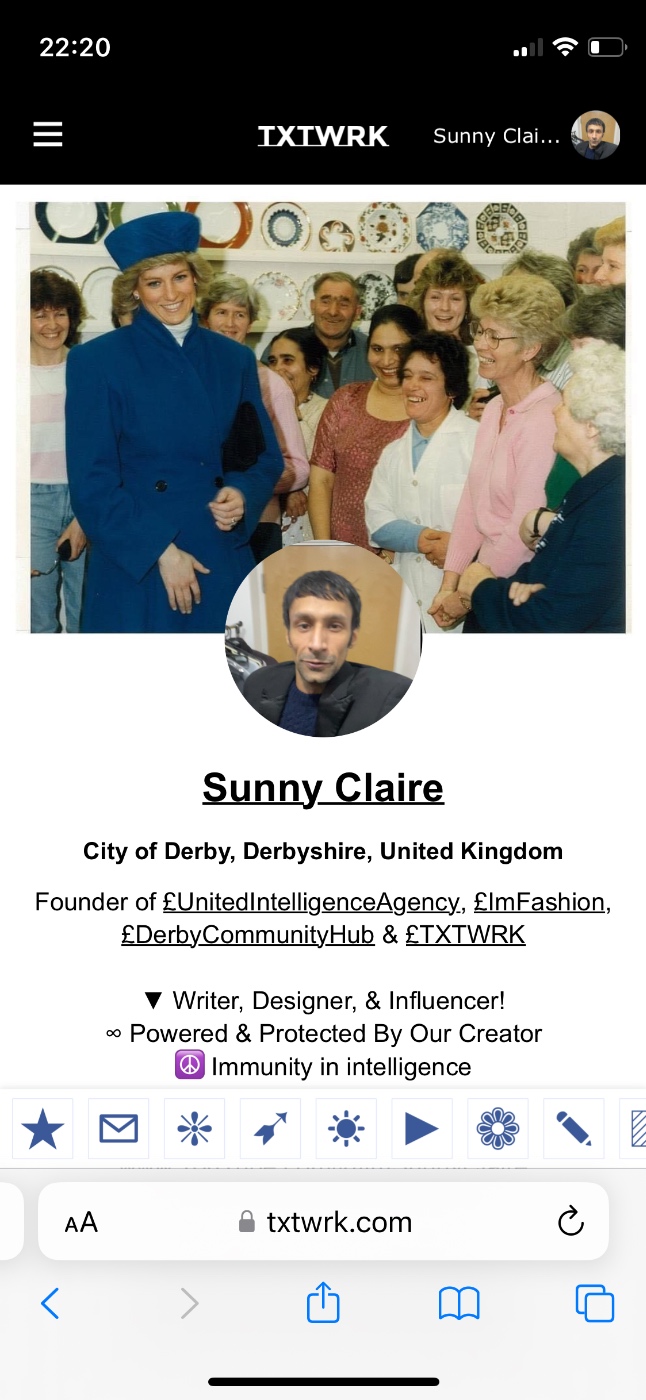
My profile in 2024… New changes ahead in 2025… @TXTWRK #Work #Life #SocialMedia

🗖 VIEW
SPONSORED AD
⛶
Neutral
A progress update after 17 months of developing TXTWRK, the world’s best network in the making!

We’ve made a bunch of new updates lately for our notification and checklist technology. You can now query a member’s engagements, you can also query a members directory to see their files, you can also format a message to switch between raw code and link code, you can copy raw code and you can copy the link of a comment too. — You will also be able to do all of these things on replies and threadlets in the next 24 hours, alongside doing some of these things when viewing applicants. We’ve tried to make the process a lot more easier and organised when things get busy.

Notification updates recently includes being able to hide individual notifications or hide notifications from a member, to help you manage your notifications better. You can still view notifications from them, if you choose to do so via the visibility filter. We will also introduce the ability to set rules and to be able to make labels/groups to segregate your notifications to the highest of levels for network delivery.

In other news, it’s super interesting how we have managed to link our API Directory kit to members directories for checklist owners servers, so now you can click on “Query Member Directory” to see a members files with ease for a checklist they are working on. We also made changes to primarily uploading files versus adding files to comments, which enables businesses & charities to own & manage their own data.

There’s lots more news coming up over the next two weeks, from seeing our advertising system in action, right up to taking a lead in the leaders innovation fund for the United Kingdom government programme is 2025.

You will see us develop in the live space over the next 48 hours, talking about this new fund being offered by the UK government which we will be encouraging UK entrepreneurs to apply to this leaders fund as well. We understand that we are eligible for this fund and with our recent progress @DerbyCollege, we’re looking forward to being a pioneer in work based technology for many years to come, where Derby College has expressed their interest in continuing our work & expanding upon our partnerships via Derby Community Hub & TXTWRK, alongside other ventures of our founder, such as UIA The Game & The ImFashion Group. We started on our journey to help people volunteer and now we’re achieving this goal, alongside inspiring the next generation of students, who most needed our opportunities.

Nearly 6 months complete in 2025, there’s no better time than now to reflect on the developments we’ve made across our life & work.

🗖 VIEW