















































TXTWRK Checklists All Activity installed today, next to Search
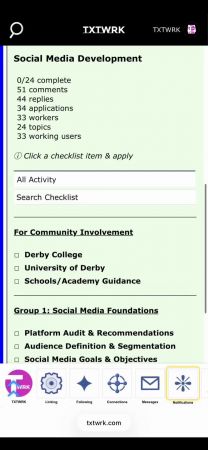
TXTWRK has extended All Activity into Checklist technologies, adding another specialised surface to an activity system that already operates across the Homepage, Profiles, Maps and the API Kit. The importance of the checklist implementation is that activity is not being developed as an isolated audit log for another product feature. Instead, the existing TXTWRK activity architecture is adapted to structured work: users can move from discovering activity across the platform to understanding activity surrounding a particular checklist, and now an individual checklist item. This gives Checklist technologies both an operational purpose—managing work—and a historical purpose—understanding how that work actually progressed.
Core capabilities introduced
•Checklist-level All Activity: activity can be viewed directly inside the checklist experience while remaining restricted to the relevant enclosing post.
•Checklist-item filtering: users can select a particular checklist item and retrieve activity associated specifically with that item.
•Existing All Activity controls remain available: username, search, time, ordering, activity categories and applicable scope controls continue to provide additional ways of exploring the history.
| All Activity surface | Context provided | What a user can learn |
|---|---|---|
| Homepage | Platform-wide discovery | What is happening across TXTWRK |
| Profile | Individual context | Activity surrounding a particular person |
| Maps | Geographic context | What is happening in a location |
| API Kit | Programmatic context | How activity can be consumed by integrations |
| Checklist | Structured-work context | How a checklist/post has progressed |
| Checklist Item | Individual work-item context | How a specific part of that checklist progressed |
What the item-level adaptation enables
•Progress investigation: review the history surrounding one individual item instead of manually searching through the entire checklist timeline.
•Process learning: completed checklists can become historical records showing how particular stages of work developed, rather than becoming static completed task lists.
•Contextual investigation: item selection can work alongside other activity controls, allowing the history to be examined by participant, period, search term or other supported activity dimensions.
| Level | Example question | Activity scope |
|---|---|---|
| Platform | What is happening across TXTWRK? | All Activity |
| Person | What has happened around this user? | Profile |
| Location | What has happened here? | Maps |
| Checklist | How did this body of work progress? | Post/checklist |
| Checklist item | How did this exact part of the work progress? | Post + selected item |
Wider product benefits
•One activity concept across multiple technologies: users encounter All Activity across Homepage, Profiles, Maps, API Kit and now Checklist technologies instead of learning unrelated history systems.
•Granularity without fragmentation: the user can move from broad discovery to post/checklist history and then individual-item history while remaining within the same conceptual activity system.
•Reusable historical knowledge: checklist activity can provide more than an audit trail; it can help users revisit previous work and understand the progression behind completed outcomes.
The comparison with established work-management technology helps clarify where this approach differs. monday.com provides board activity and an Item Activity Log. Jira records activity against individual work items, including areas such as comments, history and work logs. ClickUp provides individual task activity alongside broader Activity views. These products demonstrate the value of detailed work history. The distinguishing aspect of TXTWRK's implementation is not simply that checklist items have history, but that checklist-item activity becomes another specialised view of an activity concept already spanning people, geographic discovery, platform discovery and API consumption.
| Capability | TXTWRK | monday.com | Jira | ClickUp |
|---|---|---|---|---|
| Broad activity experience | Homepage All Activity | Board Activity Log | Primarily work-item/project activity | Activity View |
| Individual work-item history | Checklist Item All Activity | Item/Subitem Activity | Work-item Activity | Task Activity |
| Person-oriented activity context | Profiles | Person filtering | User/change information within work items | Person/activity filtering |
| Geographic activity context | Maps | Not a central Activity Log context | Not a central work-item Activity context | Not a central Activity View context |
| Programmatic activity context | API Kit | APIs available | APIs available | APIs available |
| Structured checklist context | Yes | Items/subitems | Work items/subtasks | Tasks/checklists |
| Specific checklist-item filtering | Yes | Item-level activity | Work-item level | Task/checklist activity |
| Broad-to-specific activity model | Platform → Profile/Map → Checklist → Checklist Item | Board → Item/Subitem | Project → Work item | Location → Task |
| TXTWRK distinction | One All Activity concept adapted across multiple platform technologies | Strong board/item history | Strong issue/work history | Strong task/workspace activity |
Read More


COMMUNITY
People