















































TXTWRK Workspace <> AI
Rollbacks, Downloads & the Future of Work
Development Report — Sunday, 25 October 2026
Building with AI. Working across servers. Keeping people in control.
---
1. Today's Development at a Glance
TXTWRK Workspace now brings AI-assisted development, server downloads, file history and rollback into one connected environment.
| Feature | What's New | Why It Matters |
|---|---|---|
| <> AI <> | Export code to AI, inspect returned ZIPs and apply approved changes | AI-assisted development with human control |
| Smart Downloads | Select files, folders, extensions and size limits | Download only what's needed |
| Basic Rollback | Restore the previous saved version | Recover from mistakes |
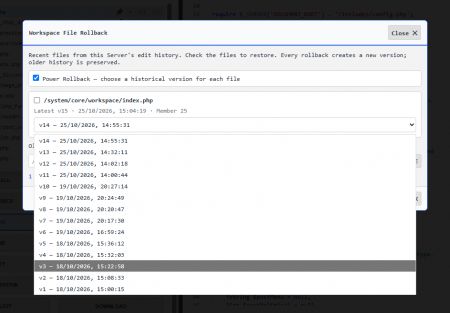
| Power Rollback | Choose an earlier version by date | Greater historical control |
| Rollback Explorer | Folder trees, version selectors and orange recent-edit dots | Find and restore files faster |
| Saved Path Sets | Remember named groups of files and folders | Reuse working configurations |
| Audit History | Personal and server-wide edit records | Accountability and traceability |
| Cross-Device Settings | Preferences saved on the connected Server | Continue work across devices |
---
2. <> AI <> — From Source Code to AI and Back
TXTWRK's new AI overlay helps people work with an AI client of their choice without requiring a repository migration.
``
YOUR CONNECTED SERVER
|
v
SELECT FILES / FOLDERS
|
v
DOWNLOAD AI ZIP
|
v
AI CLIENT OF CHOICE
|
v
RETURN UPDATED ZIP
|
v
INSPECT & APPROVE
|
v
APPLY TO LIVE FILES
|
v
SAVE VERSION + AUDIT
`
Example: Updating a website
A developer selects:
`
/index.php
/system/core/layout/
/system/core/workspace/
`
They download a ZIP, ask an AI assistant to improve the interface, then upload the returned ZIP into Workspace.
TXTWRK presents the changes for review. Once approved, the updated files are applied to their original server paths and version history is maintained.
Important: AI does not automatically decide what goes live. The authorised user reviews and confirms the changes.
---
3. Smart Downloads — Your Server, Your Selection
Users can download all eligible server files or specify exactly which paths to include.
| Control | Example |
|---|---|
| Include paths | /system/core/ |
| Exclude folders | /vendor/ |
| Exclude media | Skip common audio, video and image files |
| Exclude extensions | .mp4`, .mp3, .zip, .log |
| Maximum file size | Skip files larger than 10 MB |
| Include edit history | Optional .txtwrk version files |
| Named presets | Website Core, Community Project |
The export correction now supports legitimate hidden files, including:
``
/.htaccess
/system/core/1-images/.htaccess
`
Both paths were confirmed in a subsequent AI handoff ZIP.
The leading / identifies the connected Server's document root. Automatic AI imports still restrict replacement of sensitive infrastructure files such as .htaccess`.
---
4. Rollback — Two Methods, One History
TXTWRK now provides two ways to explore files for rollback.
| My Recent Edits | All Dropdown Files |
|---|---|
| Files from your personal edit history | Files across your saved selector groups |
| Focused on your own work | Focused on your organised working environment |
| Useful for correcting recent changes | Useful for finding project files |
``
▼ /system/
▼ core/
▼ layout/
● header.php
Version: v55 — 25 Oct 2026 ▼
Previous: v54
● post_script.php
Version: v18 — 25 Oct 2026 ▼
▼ workspace/
index.php
Version: v32 — 24 Oct 2026 ▼
`
● Orange indicator: Edited within the last seven days.
The tree supports folder expansion, search, historical dates and version dropdowns.
Two restoration choices
•Basic Rollback: Restore the immediately preceding saved version.
•Power Rollback: Select a particular historical version and restore it after confirmation.
Files without suitable history can still be displayed, but they cannot be rolled back until an earlier version exists.
---
5. File Versions, Logs & Remembered Settings
TXTWRK uses numbered .txtwrk` files to preserve edit history.
Example: An AI update
``
BEFORE AI UPDATE
header.php
header.php.txtwrk.53
header.php.txtwrk.54
AI UPDATE APPROVED
|
v
AFTER AI UPDATE
header.php ← Latest content
header.php.txtwrk.53
header.php.txtwrk.54
header.php.txtwrk.55 ← New edit version
``
The version number advances according to that file's history.
Connected-server records
| Record | Purpose |
|---|---|
| logs/master_log.php | Server-wide edit activity |
| logs/{user_id}/edits.php | Individual member's edit history |
| logs/{user_id}/settings.php | Saved preferences and path sets |
For example, a developer can save a Website Core path set on their desktop and access the same remembered settings when using Workspace on another device.
---
6. Workspace, Server & Checklists — How They Connect
These are distinct TXTWRK capabilities that complement one another.
| Product | Role |
|---|---|
| Server | Connect and configure independently hosted infrastructure |
| Workspace | Private working environment for authorised server contributors |
| Checklists | Organise projects, groups, discussions, files and participation |
| Checklisting | Checklists a member is participating in |
| <> AI <> | Extend Workspace with AI-assisted file changes |
``
COMMUNITY PROFILE
|
v
CHECKLIST: WEBSITE PROJECT
/Assets/
/Campaigns/
/Entities/
/Intelligence/
/Production & Procure/
|
v
VOLUNTEERS & CONTRIBUTORS
|
v
CONNECTED SERVER
|
v
AUTHORISED WORKSPACE TEAM
|
v
AI DEVELOPMENT + ROLLBACK
``
A Checklist can organise the project and welcome volunteers, while Workspace provides authorised developers with a separate environment for working on the connected Server.
This distinction allows communities to coordinate participation without granting everyone source-code access.
---
7. Who Benefits? Real-World Examples
| Audience | Example Use |
|---|---|
| Communities | Organise volunteers through Checklists while developers maintain the community website |
| Startups | Improve product code with AI and preserve earlier versions |
| Students | Learn file structures, version history and responsible AI development |
| Businesses | Manage selected directories and track authorised changes |
| Researchers | Maintain project files and structured working environments |
| Public-interest teams | Review and recover changes to community-facing digital services |
A startup maintains its product website on its own Server. Its founder saves a Product Interface preset, downloads the relevant source, asks an AI assistant to improve mobile navigation, and reviews the returned ZIP.
If a problem appears after deployment, the team can locate the affected file and restore a previous version.
The benefit is not simply faster code generation. It is a more organised process for making and recovering changes.
---
8. The Future of Work — Why This Matters
TXTWRK is bringing together four essential elements:
``
PEOPLE
|
v
CONNECTED WORKFLOWS
``
What makes this direction important?
•Choice: Users can work with independently connected Servers and AI clients of their choice.
•Control: Users select what is exported and approve what is applied.
•Continuity: Saved path sets and edit history support ongoing work.
•Recovery: Rollback provides a route back to earlier versions.
•Opportunity: Communities, startups and individuals can use related tools within one wider network.
What comes next?
Further priorities include visual code comparisons, stronger multi-file recovery, improved security review and more extensive live integration testing.
Today's development passed local PHP and JavaScript checks and interface tests, and the hidden-file export correction was confirmed in a downloaded archive. Full end-to-end production validation of the AI import and deployment workflow remains important.
---
Closing Statement
25 October 2026 represents a meaningful development milestone for TXTWRK Workspace.
What began as a connected environment for working with server files is expanding into a system that supports AI-assisted changes, portable working configurations, historical restoration and accountable development.
TXTWRK's wider ambition is to connect people, communities, projects and infrastructure—making sophisticated digital work more accessible without taking control away from the people responsible for it.
AI helps create. TXTWRK helps organise, apply and recover. People remain in control.
TXTWRK.com | Building the next experiences together.
@TXTWRK!
Read More

COMMUNITY
People