















































TXTWRK — FULL DEVELOPMENT & API CONSOLIDATION REPORT
Report Date: 13 October 2026
Project: TXTWRK
Subject: Original Directory API Kit, Server API Kit and Messaging API Kit compared with the consolidated Workspace, Checklist and Messaging platform.
---
1. EXECUTIVE SUMMARY
TXTWRK began with three principal API kits:
1. Directory API Kit
2. Server API Kit
3. Messaging API Kit
The objective was to consolidate these technologies into one connected infrastructure that would allow users to manage files, communicate, collaborate and use their own Connected Servers for storage.
The project has progressed from individual API capabilities into a broader platform consisting of:
•Connected Server infrastructure
•Workspace file management
•Checklist collaboration
•Messaging and private media
•Shared filesystem operations
•Centralised access control
•Attachment reference synchronisation
•Media processing and thumbnails
•Integrated directory viewers
•Mobile-responsive overlays
The most important achievement is the separation of storage, identity, permissions and collaboration records while allowing these systems to operate together.
The remaining development concerns primarily involve file-reference integrity, deletion handling, thumbnail synchronisation and complete cross-kit verification.
---
2. ORIGINAL DIRECTORY API KIT
Original Purpose
The Directory API Kit provided the foundation for managing files and folders through TXTWRK.
Its responsibilities included:
•Browsing directories
•Listing files and folders
•Creating files
•Creating folders
•Uploading files
•Downloading files
•Renaming files and folders
•Moving files and folders
•Deleting files and folders
•Accessing authorised server directories
Development Progress
The Directory API functionality has been integrated into both Workspace and Checklist.
Workspace provides general-purpose file management.
Checklist provides a more restricted directory experience associated with a particular Checklist, its selected Connected Server and its participants.
Current Architecture
The Directory API is no longer best understood as a completely independent user-facing feature.
It provides reusable filesystem functionality that other TXTWRK kits consume.
Assessment
Status: Implemented and integrated.
Additional work remains to ensure deletion and reference synchronisation behave consistently across every consuming feature.
---
3. ORIGINAL SERVER API KIT
Original Purpose
The Server API Kit established the connection between TXTWRK Central and a user's Connected Server.
Its responsibilities included:
•Server registration
•Server verification
•Remote agent installation
•Server identification
•Secret-based authentication
•Signed API requests
•Remote filesystem operations
•Server ownership and permissions
Server Verification
The original verification process was designed to confirm that:
1. /TXTWRK.php was installed.
2. The server executed PHP correctly.
3. The remote agent possessed the expected secret.
4. The server identified itself correctly.
5. The server supported the required TXTWRK protocol.
Server URLs and secrets were resolved centrally rather than accepted directly from browser input.
Consolidated Architecture
The Connected Server model now supports multiple application features.
The general request flow is:
TXTWRK Interface
↓
TXTWRK Central API
↓
Session and Permission Validation
↓
Connected Server Selection
↓
Signed API Request
↓
Customer's /TXTWRK.php Agent
↓
Filesystem Operation
↓
Operation Result
↓
TXTWRK Central
The central API uses signed requests incorporating a timestamp, nonce and HMAC-SHA256 authentication.
Development Achievement
The Server API provides a common infrastructure for:
•Workspace operations
•Checklist directories
•Messaging media storage
•Authorised file access
•Remote uploads and downloads
Assessment
Status: Core architecture implemented.
Complete security and production-readiness verification still requires end-to-end testing.
---
4. ORIGINAL MESSAGING API KIT
Original Purpose
The Messaging API Kit was designed to provide private communication while allowing users to store media through Connected Servers.
The original concept included:
•Personal conversations
•Group conversations
•Private file sharing
•Server-backed media uploads
•Multimedia previews
•Downloadable attachments
•User-controlled storage capacity
Consolidated Messaging Architecture
Messaging now participates in the common Connected Server model.
The reviewed central gateway supports:
•Personal Messaging identity
•Accepted Messaging Access grants
•Group upload authorisation
•Direct-message upload authorisation
•Server-backed media storage
Important Architectural Separation
Messaging identity and storage entitlement are not the same thing.
A user may be authorised to store files on a particular Connected Server without representing that server owner's Messaging identity.
This allows TXTWRK to distinguish:
Who is communicating?
from:
Which Connected Server may store the files?
Assessment
Status: Shared storage authorisation implemented.
The complete Messaging attachment lifecycle still requires verification, particularly Rename, Move, Delete and database-reference consistency.
---
5. WORKSPACE KIT
Purpose
Workspace is TXTWRK's general-purpose file-management and working environment.
It uses the Connected Server infrastructure to perform authenticated filesystem operations.
Implemented Functionality
•Directory browsing
•File and folder listing
•File creation
•Folder creation
•Uploads
•Downloads
•Rename
•Move
•Delete
•File editing
•File versions
•Edit locks
•File ownership checks
•Edit requests
•ZIP compression
•ZIP extraction
•Delegated File Access
•Checklist integration
Original Compatibility
The early Workspace implementation preserved the existing manage.php action contract.
This allowed the original browser interface to continue functioning while filesystem operations were routed through the Connected Server agent.
Checklist Integration
Workspace became aware of Checklist file relationships.
When supported Checklist files or directories are moved, the Workspace implementation can invoke central reference synchronisation.
This is important because files are no longer treated solely as independent filesystem objects.
They may also be attachments belonging to Checklist comments, replies or Threadlets.
Assessment
Status: Implemented with substantial integration.
Remaining work concerns consistency after deletion, partial failures and cross-feature reference updates.
---
6. CHECKLIST KIT
Purpose
Checklist provides task-oriented collaboration connected to files, participants and discussions.
Core Functionality
•Checklist creation and organisation
•Checklist items
•Grouped items
•Item navigation
•Checklist overlays
•Applications
•Apply Now
•Active participants
•Comments
•Replies
•Threadlets
•Connected files
•Member directories
•File viewers
•Activity information
Connected Server Integration
Each Checklist can be associated with a selected Connected Server.
The directory system operates within the Checklist's authorised context.
The later gateway implementation checks the relationship between:
•Checklist ID
•Server ID
•Checklist owner
•Active participant
•Requested member directory
This helps prevent Checklist directory access from becoming unrestricted Workspace access.
Comments and Replies
The discussion system supports attached files and richer content.
The reviewed work includes:
•Comment attachments
•Reply attachments
•File listings
•Image previews
•Video previews
•Thumbnail handling
•Formatting controls
•Comment sorting
•Reply interactions
•Web Impression content
Threadlets
Threadlets extend Checklist conversations with nested discussion.
Development work included:
•Nested Threadlet presentation
•New Threadlet controls
•Connected file lists
•Image and video attachments
•Primary media previews
•Thumbnail handling
•Pagination
•Mobile indentation
•Visual discussion boundaries
Threadlet attachments use an independent database structure, including threadlet_media_files.
Mobile Development
Recent work addressed:
•Safari overlay scrolling
•Background-page scroll interference
•Checklist scroll-container targeting
•Apply Now navigation
•Dynamic comment viewers
•Web Impression display
•Threadlet presentation
The revised Apply Now behaviour was reported working after testing.
Assessment
Status: Broad functionality implemented and actively refined.
Some attachment lifecycle and interface interactions still require comprehensive regression testing.
---
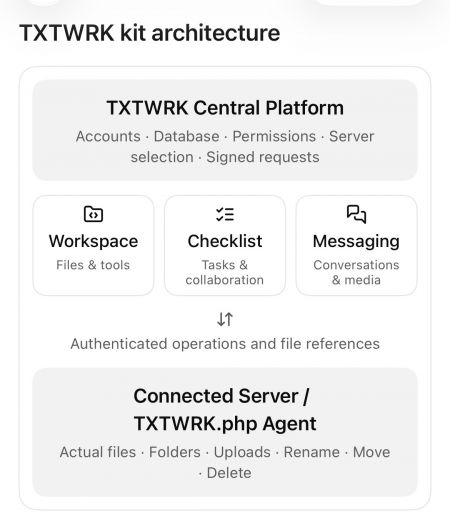
7. API CONSOLIDATION ARCHITECTURE
The consolidated architecture can be represented as:
TXTWRK CENTRAL
│
├── Server Management
│ ├── Server registration
│ ├── Verification
│ ├── Stored credentials
│ └── Signed communication
│
├── Workspace Kit
│ ├── File management
│ ├── File editing
│ ├── File permissions
│ └── Checklist integration
│
├── Checklist Kit
│ ├── Items and groups
│ ├── Applications
│ ├── Comments and replies
│ ├── Threadlets
│ ├── Connected files
│ └── Member directories
│
├── Messaging Kit
│ ├── Personal identity
│ ├── Delegated identity
│ ├── Group/direct messaging
│ └── Server-backed media
│
├── Shared Authorisation
│ ├── Server ownership
│ ├── File Access
│ ├── Checklist membership
│ └── Messaging Access
│
└── Shared File Reference Management
├── Comment references
├── Reply references
└── Threadlet references
│
▼
CONNECTED SERVER
│
└── /TXTWRK.php
├── Files
├── Folders
├── Uploads
├── Downloads
├── Rename
├── Move
└── Delete
This represents the logical architecture visible in the reviewed code. It does not imply that every component has been consolidated into one physical PHP file.
---
8. FILE REFERENCE SYNCHRONISATION
One of the most important later developments was central attachment-reference synchronisation.
Purpose
When a file or directory changes location, TXTWRK must preserve the relationship between that file and the content referencing it.
Current Implementation
The reviewed function is:
txtwrkSyncConfirmedMoves()
It is designed to run after the Connected Server confirms a Rename or Move operation.
Database Tables
Checklist Comments
Table:
post_c_comment
Fields:
•file_connected_array
•thumbnail
Checklist Replies
Table:
checklist_reply_uploads
Field:
•file_location_name
Threadlets
Table:
threadlet_media_files
Fields:
•relative_path
•original_name
Server Isolation
Reference updates are scoped to the selected Connected Server.
This prevents an operation on one server from indiscriminately updating matching paths belonging to another server.
Example
Original attachment:
/opensource/system/checklists/user_i/files/photo.jpg
Renamed attachment:
/opensource/system/checklists/user_i/files/new-photo.jpg
After a confirmed Rename operation, the synchronisation function can update the relevant stored references.
Current Limitations
The reviewed implementation does not fully establish:
•Reference cleanup after Delete
•Synchronisation of Threadlet thumbnail_path
•Complete Messaging attachment synchronisation
•Automatic recovery from partial failures
Assessment
Status: Rename/Move synchronisation implemented for reviewed Checklist attachment structures.
Deletion and broader lifecycle consistency remain unfinished or unverified.
---
9. ORIGINAL CODE VERSUS CURRENT DEVELOPMENT
| Capability | Original Foundation | Developed System |
|---|---|---|
| Directory API | General filesystem operations | Integrated Workspace and Checklist file management |
| Server API | Connect and verify servers | Shared Connected Server infrastructure |
| Messaging API | Private communication and media | Integrated storage authorisation |
| Workspace | Existing file-management actions | Connected Server routing and Checklist integration |
| Checklist | Items, comments and replies | Directories, richer media and Threadlets |
| Authentication | Signed server requests | Additional feature-specific permission checks |
| Attachments | Feature-specific stored paths | Central Rename/Move synchronisation |
| Media | Existing uploads and previews | Expanded thumbnail and video handling |
| Mobile UI | Existing responsive controls | Targeted overlay and scrolling corrections |
Later work should therefore be described primarily as consolidation, integration, extension and refinement rather than the creation of every capability from nothing.
---
10. SECURITY AND ACCESS CONTROL
The reviewed architecture includes several protection layers.
Connected Server Security
•Server verification
•Server ID checks
•Stored server secrets
•Signed requests
•Timestamp and nonce handling
Workspace Security
•Server ownership checks
•File Access permissions
•Allowed folders
•Allowed files
•Path validation
Checklist Security
•Checklist ID validation
•Server association
•Owner/participant checks
•Member directory restrictions
Messaging Security
•Messaging Access grants
•Delegated identity handling
•Group upload authorisation
•Direct-message upload authorisation
•Separation of identity and storage entitlement
Remaining Security Work
•End-to-end authorisation testing
•Cross-server isolation tests
•Path traversal testing
•Partial-operation recovery
•Destructive-operation permission checks
•Consistent error handling
Assessment
Status: Multiple security layers implemented.
A complete production security audit has not been established from the available files.
---
11. DEVELOPMENT PROGRESSION
Phase 1 — Original API Foundation
Established:
•Directory API
•Server API
•Messaging API
•Connected Server verification
•Remote filesystem communication
Phase 2 — Backend Consolidation
Developed:
•Shared Connected Server communication
•Signed operations
•Central server selection
•Permission routing
•Workspace compatibility
Phase 3 — Workspace Integration
Expanded:
•Remote file management
•File editing
•File locks
•Versions
•Archive operations
•Delegated File Access
Phase 4 — Checklist Integration
Developed:
•Checklist-selected Connected Servers
•Participant directories
•Connected file management
•Comment and reply attachments
•Directory viewers
Phase 5 — Collaboration Expansion
Refined:
•Threadlets
•Connected media
•Video thumbnails
•Web Impressions
•Nested discussion presentation
Phase 6 — Reference Synchronisation
Implemented:
•Comment attachment path updates
•Reply attachment path updates
•Threadlet attachment path updates
•Server-scoped Rename/Move synchronisation
Phase 7 — Interface Refinement
Addressed:
•Mobile Safari scrolling
•Overlay behaviour
•Apply Now navigation
•Dynamic viewers
•Threadlet layout
•Pagination interactions
Phase 8 — Current Consolidation Completion
Outstanding priorities:
•Safe deletion handling
•Thumbnail-path synchronisation
•Messaging reference verification
•Consistent operation results
•Cross-kit regression testing
•Security and failure-recovery testing
---
12. CURRENT DEVELOPMENT STATUS
| System | Assessment |
|---|---|
| Connected Server infrastructure | Implemented |
| Server verification | Implemented |
| Signed API requests | Implemented |
| Directory API integration | Implemented |
| Workspace file operations | Implemented |
| Checklist directories | Implemented |
| Checklist comments/replies | Implemented |
| Threadlets | Implemented |
| Media and thumbnails | Implemented with remaining path-consistency work |
| Messaging storage authorisation | Implemented in gateway |
| Checklist Rename/Move reference sync | Implemented |
| Delete reference protection | Incomplete or unverified |
| Threadlet thumbnail-path sync | Incomplete |
| Complete Messaging attachment lifecycle | Not fully verified |
| Cross-kit integration testing | Not established |
| Production security audit | Not established |
---
13. REMAINING DEVELOPMENT PRIORITIES
Priority 1 — Attachment Deletion
Establish a consistent policy for deleting files still attached to comments, replies or Threadlets.
Recommended approach:
Block deletion while active references exist, unless an explicit attachment-removal workflow is used.
Priority 2 — Threadlet Thumbnails
Synchronise or invalidate thumbnail_path when the corresponding media is renamed or moved.
Priority 3 — Messaging Integration
Verify Messaging file-reference behaviour against the same lifecycle standards used for Checklist attachments.
Priority 4 — Shared API Responses
Standardise operation responses across controllers and the Connected Server.
Avoid forcing success = true when the remote operation has failed.
Priority 5 — Cross-Kit Testing
Test complete workflows involving multiple kits.
Example:
1. Upload a file through Checklist.
2. Attach it to a comment.
3. Open it through Workspace.
4. Rename it.
5. Confirm the comment still opens it.
6. Move its parent directory.
7. Confirm the reference updates.
8. Attempt deletion.
9. Verify the selected deletion policy is enforced.
Priority 6 — Stability
Preserve existing user interfaces and controls while strengthening the shared backend.
Avoid creating additional parallel APIs for operations already supported by the consolidated infrastructure.
---
14. FINAL ASSESSMENT
The original TXTWRK architecture began with:
DIRECTORY API KIT
The developed architecture now consists of:
TXTWRK CENTRAL
The central architectural achievement is that file storage, user identity, authorisation and collaboration records can remain separate while operating through common infrastructure.
Workspace manages files.
Checklist organises work and associates files with collaborative discussions.
Messaging provides private communication and authorised media storage.
The Server API establishes trusted communication with Connected Servers.
The Directory API supplies reusable filesystem operations.
The consolidation layer connects these responsibilities.
Overall Conclusion
TXTWRK has progressed substantially beyond its original three-kit foundation.
It now represents an integrated platform for connected storage, file management, collaborative Checklist work and Messaging.
The next development milestone is not another independent API Kit.
It is completing the consistency of the existing consolidated architecture across every file operation, permission boundary and attachment relationship.
The foundation is implemented. The remaining challenge is complete cross-kit reliability and verification.
---
REPORT SCOPE
This report is based on:
•Original API source files shared in the conversation
•Subsequent Workspace and Checklist implementations
•Connected Server gateway and runtime code
•Messaging-related gateway code
•Reference synchronisation functions
•Threadlet and media-related development
•Interface changes and reported testing
It does not constitute a live production audit, a complete line-by-line diff of every revision or confirmation that every generated replacement file has been deployed.
Read More

COMMUNITY
People